Highlights
- Combines a 65-inch 4K touch display, cameras, microphones, speakers, and whiteboarding in one standalone collaboration device.
- The triple 50 MP camera system and 16-MEMS microphone array support integrated meeting video and full-duplex audio coverage up to 12 m.
- A 20-point multi-touch, anti-glare display gives multiple in-room participants a practical surface for presenting and annotating together.
- Wired and IP BYOD workflows can let a laptop use the board’s camera, microphones, speakers, and touch display for meetings.
- HDMI output supports a second 4K display at 60 Hz for dual-screen room deployments.
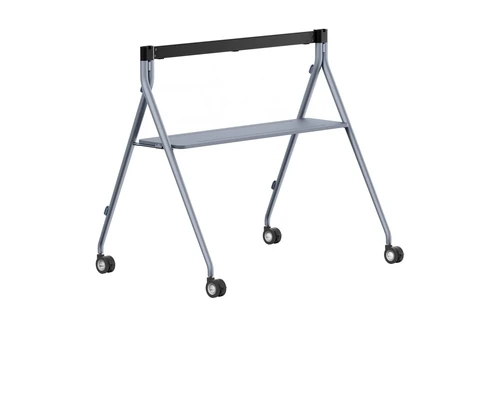
- Wall and floor deployment options support fixed-room or more flexible installation planning.
Ideal For
- Small meeting rooms and huddle spaces for 1–6 people
- Microsoft Teams Rooms and Zoom collaboration spaces
- Executive meeting rooms that need integrated video, audio, and interactive whiteboarding
- Flexible meeting spaces that need wired or IP-based BYOD options
- Organizations standardizing interactive collaboration systems across multiple locations
Resources
Yealink MeetingBoard 65 Pro 65-Inch 4K Interactive Whiteboard
The Yealink MeetingBoard 65 Pro brings interactive whiteboarding, video, audio, and touch collaboration together in a single 65-inch 4K display. Buyers considering an all-in-one room system can reduce the number of separate components needed for a small meeting space while giving local and remote participants a shared visual workspace.
It is best suited to small rooms for 1–6 people. The integrated triple 50 MP camera system, 16-MEMS microphone array, 36 W speakers, and 20-point touch display make it well suited to meeting and collaboration spaces where teams want to join calls, present content, and annotate directly on the board. Plan mounting, platform licensing, and any BYOD or second-display requirements before ordering.
Platform Compatibility

- Certification evidence is for the MeetingBoard 65 Pro model; the supplied manufacturer product page does not itself publish the MB65PRO-A02 suffix.
- Requires Zoom Rooms appliance firmware 331.320.0.30 or later; Zoom’s directory identifies the 65/75/86 Pro family rather than the MB65PRO-A02 SKU suffix.
- PA20 and WPP30 are unavailable in the US; Yeacast App BYOD is available only in General Mode.
Key Specifications
- Display: 65-inch 4K multi-touch LCD with 3840 x 2160 resolution
- Touch and screen finish: 20 touch points with anti-glare coating
- Camera system: Built-in triple 50 MP cameras
- Audio: 16-MEMS microphone array, 36 W speakers, and up to 12 m full-duplex audio coverage
- Operating system and memory: Android 13, 8 GB RAM, 64 GB storage
- Video output: HDMI output supports up to 4K at 60 Hz for a second display
- Deployment: Supports wall or floor installation; mounting accessories are optional
- Product dimensions and net weight: 1484 x 105 x 955 mm (W x D x H); 40 kg
- Packaged dimensions and gross weight: 1660 x 220 x 1045 mm (W x D x H); 50 kg / 110.2 lb
What's Included
- MeetingBoard Pro display
- Cable pack with 3 m AC power cable and 3 m CAT5E network cable
- Four stylus pens
- Quick Start Guide
Compatibility
- Meeting platforms: Certified for Microsoft Teams and Zoom.
- Microsoft Teams Rooms: Requires a Microsoft Teams Rooms Basic or Pro license for Teams Rooms operation.
- Laptop BYOD: Supports wired BYOD through VCH51, CTP25, or HDMI input plus USB-B.
- IP BYOD: Supports documented IP BYOD methods through PA20, WPP30, or the Yeacast App; PA20 and WPP30 are not available in the US market, and Yeacast App BYOD is General-Mode only.
- Second-display deployment: HDMI output supports a second display at up to 4K at 60 Hz; a touch-enabled second display can use USB for dual-screen touch.
- Expansion and room accessories: Yealink lists optional floor stands, wall mounts, CTP25 touch controller, MB-12X Pro camera, CS10, CM20, PA20, and VCM36-W.
Licensing, Warranty & Support
For Microsoft Teams Rooms operation, assign a Microsoft Teams Rooms Basic or Pro license. Basic supports core room experiences for one certified Teams Rooms system per room; Pro adds advanced features and management and is required for organizations operating more than 25 Teams Rooms systems. Confirm Zoom account and licensing requirements for the intended deployment. A wall mount and floor stand are optional accessories, not standard included items. Yealink provides deployment, integration, management, user-manual, FAQ, and video-tutorial resources. For centralized device management, Yealink RoomConnect supports the MeetingBoard Pro when configured with MCore OPS-T, including device reporting, firmware updates, and basic diagnostics. Confirm standard warranty coverage before ordering.
VideoConferenceGear.com Assistance
We can help validate the MeetingBoard 65 Pro for your room size and collaboration platform, confirm Teams Rooms licensing and BYOD requirements, select the appropriate mount and expansion accessories, and coordinate multi-location deployment and ongoing support. Contact us to plan a complete MeetingBoard room configuration.
Common Questions
What room size is the MeetingBoard 65 Pro intended for?
The MeetingBoard 65 Pro is intended for small rooms with 1–6 people. For larger spaces, Yealink positions the 75 Pro for 6–12 people and the 86 Pro for 12–20 people.
Is a wall mount included?
No. The MB-WallMount is sold separately, and Yealink lists wall mounts and floor stands as optional accessories.
Can a laptop use the board’s camera, microphones, speakers, and touch display for BYOD meetings?
Yes. Wired BYOD can use VCH51, CTP25, or HDMI input plus USB-B, while documented IP BYOD methods include PA20, WPP30, and the Yeacast App. PA20 and WPP30 are not available in the US market.
Does the MeetingBoard 65 Pro require a Microsoft Teams Rooms license?
Yes, for Microsoft Teams Rooms operation, assign a Microsoft Teams Rooms Basic or Pro license. Basic covers core room experiences, while Pro adds advanced capabilities and is required when an organization has more than 25 Teams Rooms systems.
Can the MeetingBoard 65 Pro drive a second display?
Yes. Its HDMI output supports a second display at up to 4K at 60 Hz, and USB can enable dual-screen touch when the second display is touch-enabled.
Warranty Information
Standard Warranty: 2 Years Limited Hardware Warranty.Coverage: Includes repair or replacement for manufacturing defects.
Product Videos
Custom Field
Product Reviews
Cloud Connextions Nationwide Services - Design, Installation & Support - A Partner You can Trust
Cloud Connextions specializes in delivering next-generation office technologies, including physical security, video conferencing, and ProAV solutions. As a valued partner for the design, integration, and support of these systems, we work with industry leaders like Verkada, Zoom, AVer, Crestron, Poly, and more. Our team ensures you receive top-quality products and seamless service. VideoConferenceGear.com is our trusted online source, where you’ll find rigorously tested products backed by our extensive expertise in creating customized technology solutions for modern office environments.