

Highlights
- Run meetings from a user’s own laptop while accessing connected room cameras, microphones, speakers, sound bars, and displays.
- Display up to two sources simultaneously for side-by-side participant sharing.
- Support cable-free presentation through ClickShare Buttons, the ClickShare App, AirPlay, Google Cast, or Miracast.
- Deliver up to 4K UHD output for rooms with 4K-capable displays.
- Use touchback, annotation, blackboarding, and touch-screen interactivity with supported interactive displays.
Ideal For
- Small and medium corporate meeting rooms
- BYOD video-conferencing rooms using employee or guest laptops
- Huddle spaces that need wireless presentation and room-peripheral access
- Rooms with interactive touch displays for annotation and touchback collaboration
Resources
Barco ClickShare CX-30 Gen 2 Wireless USB Conferencing System for Small to Medium Rooms
ClickShare CX-30 Gen 2 gives meeting participants a wireless way to present and run video meetings from their own laptops while using the room’s camera, microphones, speakers, sound bar, and display. It is a strong fit for teams that want a BYOD conferencing workflow without making a room computer the center of every meeting.
Best suited to small and medium meeting rooms, the CX-30 supports 4K display output, native AirPlay, Google Cast, and Miracast, plus interactive touch-display functions. Plan for a room display and the USB camera/audio devices needed for conferencing; this is the wireless collaboration hub that ties those room resources to each user’s laptop.
Key Specifications
- Product type: Standalone wireless conferencing and presentation system
- Manufacturer part number: R9861613USB2 — US Gen 2 version with 2 ClickShare Buttons
- Room fit: Small to medium meeting rooms
- Video output: 4K UHD, 3840 × 2160 at 30 Hz
- Display connections: HDMI 1.4b or USB-C DisplayPort 1.2
- Simultaneous presentation: Up to 2 sources on screen
- Wireless standards: IEEE 802.11 a/g/n/ac and IEEE 802.15.1; 2.4 GHz and 5 GHz with DFS
- Wireless Button reach: Up to 30 m (100 ft) between Button and Base Unit
- Network and peripheral ports: 1 × Gigabit Ethernet LAN, 1 × front USB-C 3.0, 1 × front USB-A 3.0, and HDMI output
- Security: WPA2-PSK standalone; WPA2-PSK or IEEE 802.1X with Button in network-integration mode; Kensington lock support
- Power consumption: 5–10 W operational; 24 W maximum
- Power input: Standard 110/220 V AC plug or USB-C
- Dimensions: 34 mm H × 135 mm W × 135 mm D
- Product weight: 900 g
What's Included
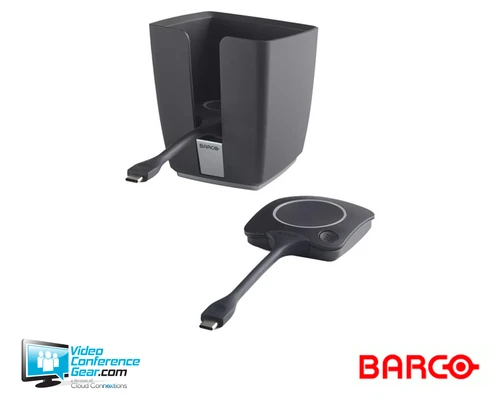
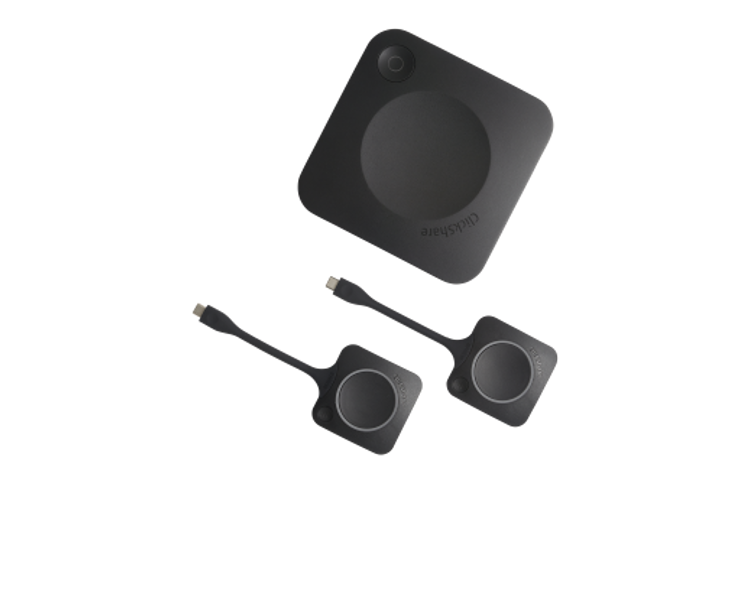
- ClickShare CX-30 Gen 2 Base Unit
- 2 × ClickShare USB-C Buttons
- Power supply
- Documentation
Compatibility
- Laptop operating systems: Windows 10 or later and macOS 11 or later.
- Mobile operating systems: Android 11 or later and iOS 14 or later through the ClickShare App.
- Wireless presentation protocols: Native AirPlay, Google Cast, and Miracast support.
- Meeting platforms: Users can run their preferred conferencing platform from their own laptop; the laptop accesses connected room AV peripherals through ClickShare.
- Required room components: Provide a room display for presentation and, for conferencing, the camera, microphone, speakers, or sound bar appropriate for the room.
- Interactive displays: Supports touchback, annotation, blackboarding, and touch-screen interactivity.
Licensing, Warranty & Support
No recurring paid license or subscription is required for core ClickShare operation. The standard manufacturer warranty is one year. SmartCare is included with each ClickShare purchase and can provide up to five years of warranty and service coverage, hardware replacement, expert support, XMS Cloud access, and analytics when the device is registered during the initial warranty period and added to XMS Cloud. Barco also provides access to product manuals, drivers, firmware, drawings, and documentation. Buyers should confirm the room display and the camera/audio peripherals needed for their intended conferencing workflow.
VideoConferenceGear.com Assistance
We can help validate whether the CX-30 is the right fit for your room, confirm laptop and meeting-platform workflows, select the display and USB conferencing peripherals it will connect to, and coordinate multi-room deployment and ongoing support. Contact us to review your room design before ordering.
Common Questions
Is R9861613USB2 the US Gen 2 bundle with two ClickShare Buttons?
Yes. R9861613USB2 is the US ClickShare CX-30 Gen 2 configuration with two ClickShare USB-C Buttons.
Can users run Teams, Zoom, or another conferencing platform from their own laptop?
Yes. Users run their preferred conferencing platform on their laptop, while ClickShare connects that laptop to the room’s camera, microphones, speakers, sound bar, and display.
Which devices can present wirelessly?
Windows 10 or later and macOS 11 or later are supported, while Android 11 or later and iOS 14 or later can present through the ClickShare App. The system also supports native AirPlay, Google Cast, and Miracast.
Does ClickShare CX-30 require a paid subscription?
No. Core ClickShare operation does not require a recurring paid subscription. SmartCare benefits are activated by registering the device during the initial warranty period and adding it to XMS Cloud.
What is included with the CX-30 Gen 2 system?
The system includes the CX-30 Gen 2 Base Unit, two ClickShare USB-C Buttons, a power supply, and documentation.
Warranty Information
1 year standard. 5 years coverage via SmartCareProduct Videos
Custom Field
Product Reviews
Cloud Connextions Nationwide Services - Design, Installation & Support - A Partner You can Trust
Cloud Connextions specializes in delivering next-generation office technologies, including physical security, video conferencing, and ProAV solutions. As a valued partner for the design, integration, and support of these systems, we work with industry leaders like Verkada, Zoom, AVer, Crestron, Poly, and more. Our team ensures you receive top-quality products and seamless service. VideoConferenceGear.com is our trusted online source, where you’ll find rigorously tested products backed by our extensive expertise in creating customized technology solutions for modern office environments.