
2MP vs. 4MP vs. 8MP Security Cameras
Posted by Physical Security Gear on 9/7/2026
How Much Resolution Do You Actually Need?
Executive Summary
One of the first specifications buyers notice when comparing security cameras is resolution.
Manufacturers promote 2MP, 4MP, 5MP, 8MP, 12MP, and even higher resolutions, often suggesting that more megapixels automatically produce a better surveillance system.
It's easy to assume that the camera with the biggest number is the obvious choice.
In reality, resolution is only one piece of the equation.
The right camera depends on what you're trying to capture, how far the camera is from the subject, lighting conditions, available storage, network bandwidth, and how the video will be used after it's recorded.
A higher-resolution camera can certainly capture more detail, but it also generates larger files, consumes more bandwidth, and isn't always necessary for every location.
The goal isn't to buy the highest resolution available.
The goal is to capture the information your organization actually needs while building a surveillance system that's efficient, scalable, and cost-effective.
What Does Camera Resolution Mean?
Resolution refers to the amount of image detail a camera can capture.
More pixels generally allow the camera to display finer details when viewing or zooming into recorded video.
For example:
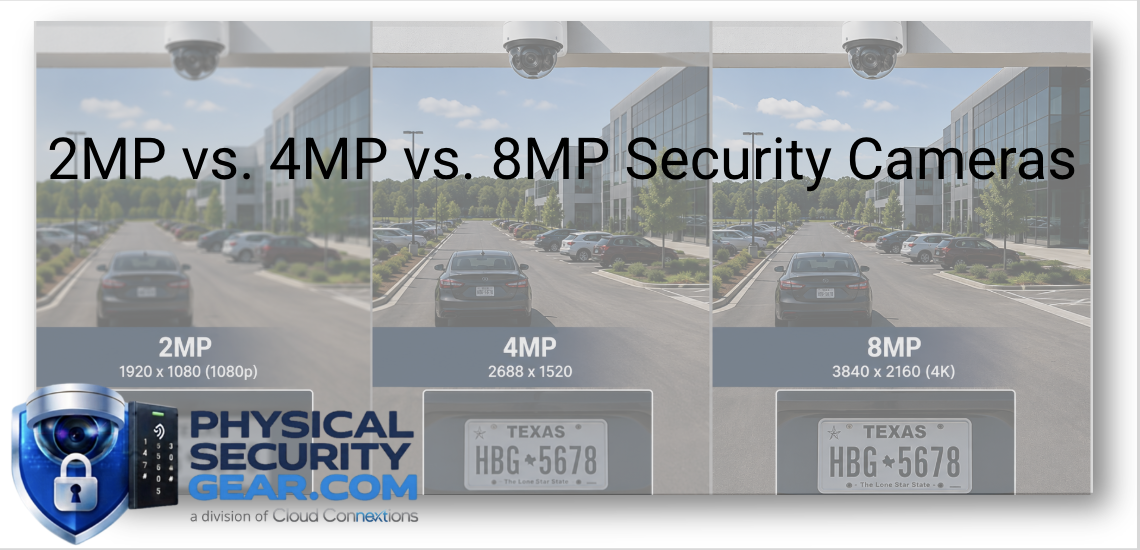
- 2MP (1080p) provides excellent general surveillance for many commercial environments.
- 4MP offers noticeably sharper detail while maintaining reasonable storage requirements.
- 8MP (4K) captures significantly more information, making it ideal for larger viewing areas or situations where digital zoom may be required.
Resolution determines how much information is available—not necessarily how useful the footage will be.
Proper camera placement is often more important than simply increasing megapixels.
Bigger Numbers Don't Always Mean Better Results
A common misconception is that every commercial camera should be 4K.
That isn't usually the case.
Imagine placing an 8MP camera 150 feet away from an employee entrance.
Even with higher resolution, identifying faces may still be difficult because the subject occupies only a small portion of the image.
A properly positioned 4MP camera installed closer to the entrance may deliver much better results while costing less and requiring less storage.
This is why surveillance design always begins with the operational objective rather than the specification sheet.
Matching Resolution to the Application
Different areas often require different levels of image detail.
For example:
2MP cameras are commonly used for:
- Hallways
- General office spaces
- Storage rooms
- Interior common areas
4MP cameras are excellent for:
- Building entrances
- Reception areas
- Exterior walkways
- Parking lot entrances
- Retail environments
8MP cameras often make sense for:
- Large parking lots
- Campus environments
- Warehouses
- Loading docks
- High-value asset protection
- Locations where digital zoom is frequently used
Using the same resolution everywhere can increase costs without improving results.
Matching the camera to the application almost always creates a better system.
Resolution Impacts More Than Image Quality
Higher-resolution cameras don't just produce sharper images.
They also affect:
- Storage requirements
- Network bandwidth
- Recording duration
- Video export times
- System scalability
Organizations planning to retain video for 30, 60, or 90 days should consider how higher-resolution cameras affect long-term storage costs.
Sometimes investing in better camera placement delivers more value than purchasing higher-resolution equipment.
What We See Most Often
Many organizations initially request the highest-resolution cameras available.
After discussing how their facilities operate, the recommendation often changes.
Rather than upgrading every camera to 8MP, we frequently recommend a combination of resolutions based on each area's operational requirements.
A reception desk doesn't have the same surveillance objectives as a parking lot.
A warehouse aisle has different needs than a server room.
The best surveillance systems use the right tool for each environment rather than applying the same specification everywhere.
Advisor's Note
One question we frequently ask is:
"What do you need to identify?"
People?
License plates?
Packages?
General activity?
The answer often determines the required camera resolution far more effectively than simply comparing megapixels.
Resolution supports the objective.
It doesn't define it.
Questions We'd Ask Before Recommending Camera Resolution
Before selecting camera resolutions, we'd typically discuss:
- What level of detail is required?
- How far will the camera be from the subject?
- How long will video be retained?
- Will digital zoom be used frequently?
- What storage requirements are acceptable?
- Will AI analytics be part of the solution?
- Are cameras monitoring people, vehicles, or property?
- How do you expect the system to grow over time?
Understanding these answers allows us to recommend a balanced solution that performs well today while remaining practical as your organization expands.
The Bottom Line
Higher resolution can absolutely improve image quality—but only when it's paired with thoughtful system design.
The most effective surveillance systems aren't built around the highest specifications.
They're built around your building, your operational workflows, and the information your organization needs when something happens.
Choosing the right camera resolution is less about buying more pixels and more about understanding the outcome you're trying to achieve.
When those goals are clear, selecting the appropriate camera becomes much easier.
Continue Your Research
Continue exploring these related resources:
- Ultimate Guide to Commercial Video Surveillance
- What Makes a Commercial Security Camera Different?
- AI Security Cameras Explained
- Dome vs. Bullet Cameras
- PTZ Cameras Explained
- Multi-Sensor Cameras Explained
- Cloud Video Recording Explained