
Can You Keep Your Existing Conference Room Hardware When Changing Meeting Platforms?
Posted by Video Conference Gear on 9/5/2026
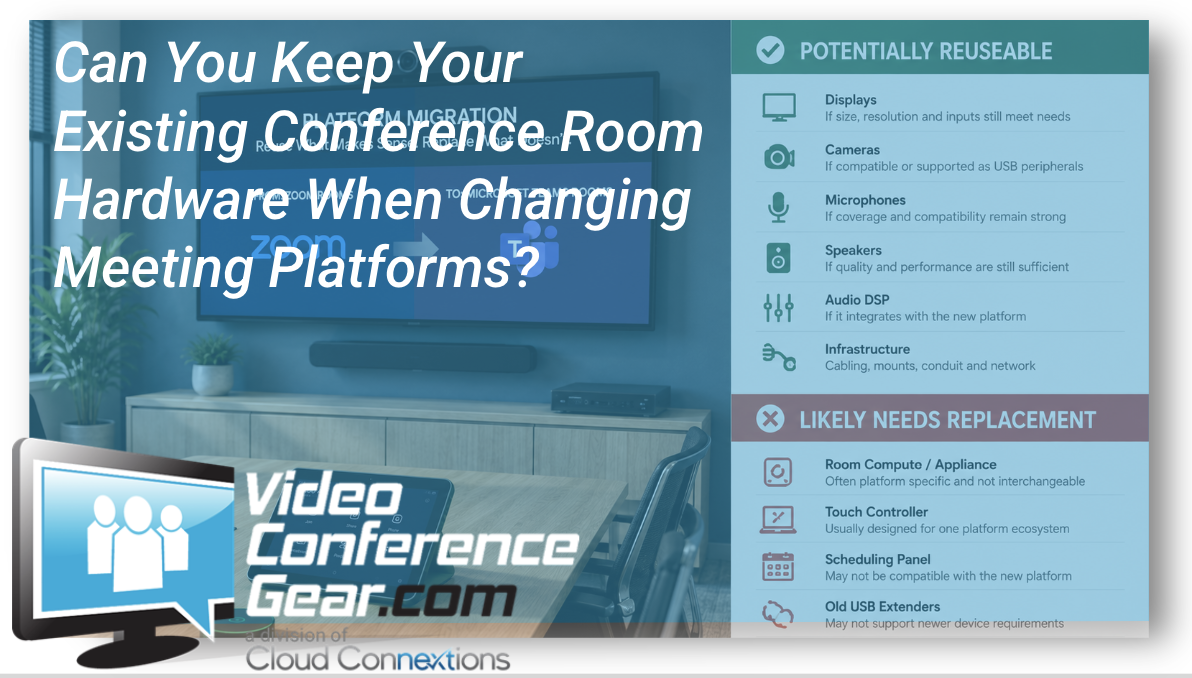
Changing your meeting platform does not automatically mean replacing your entire conference room.
That is one of the first things we look at when an organization tells us it is moving from Zoom to Microsoft Teams, Teams to Google Meet, or restructuring its collaboration environment altogether.
There may be perfectly good displays on the wall. The cameras may still provide excellent coverage. The microphones may have years of useful life left. Cabling, mounts, speakers, DSPs, and other infrastructure could still be appropriate for the room.
At the same time, assuming everything can stay can create an entirely different set of problems.
The goal should not be to reuse as much hardware as possible.
The goal should be to reuse the right hardware without compromising the experience you're trying to build.
Start by Separating the Room Into Components
Instead of looking at the conference room as one system, break it into pieces.
A typical room may include:
- Displays
- Camera or cameras
- Microphones
- Speakers
- Audio DSP
- Room computer or conferencing appliance
- Touch controller
- Scheduling panel
- USB extenders
- HDMI infrastructure
- Network connections
- Mounting hardware
- Control systems
Changing meeting platforms affects some of those components much more than others.
Your displays, for example, generally do not care whether the meeting is running on Zoom, Teams, or Google Meet.
A dedicated room appliance or controller might care very much.
That is where the evaluation should begin.
Displays Are Often the Easiest Thing to Reuse
If your existing displays are appropriately sized, functioning well, have the required inputs, and still fit the room design, there may be very little reason to replace them simply because the meeting platform changed.
The same can be true for mounts and portions of the AV infrastructure behind the wall.
But even displays deserve a quick review.
Is the resolution still appropriate?
Are the displays old enough that failure risk should factor into the project?
Does the new room design require one display instead of two, or vice versa?
Would moving the camera require adjusting display placement?
Reusing equipment makes sense when it supports the new design, not simply because it already exists.
Cameras, Microphones and Speakers Require a Closer Look
This is where compatibility becomes much more important.
Many professional cameras, microphones, speakerphones, and audio systems connect through USB or integrate into broader AV systems. Depending on the room architecture, some existing peripherals may continue to work when the meeting platform changes.
But working and being officially certified for the new environment are not always the same thing.
Microsoft maintains a certification program for Teams devices and tests products for areas including audio and video quality, compatibility, device management, and the Teams user experience.
Zoom similarly maintains certified hardware categories covering cameras, room systems, speakerphones, professional audio, controllers, schedulers, and other room devices.
Google maintains a Meet hardware peripheral qualification program and recommends certified devices for meeting rooms. Google specifically cautions that unsupported peripherals can be affected by future firmware or operating-system changes even if they have worked previously.
That does not mean an uncertified USB camera automatically belongs in the trash.
It means the relationship between that device and the new room architecture needs to be understood before you build your migration plan around it.
Certified, Compatible and Native Are Not the Same Thing
These terms can become confusing during a migration.
A certified device has gone through a platform's certification or qualification process.
A compatible peripheral may function with the platform without necessarily being part of the current certification program.
A native room appliance typically runs the room experience itself rather than merely serving as the camera or microphone connected to another computer.
Those distinctions matter.
Your existing camera might work perfectly well as a USB peripheral connected to a Windows-based room computer.
That does not necessarily mean an older Zoom Room appliance can simply be switched into a native Microsoft Teams Room.
Similarly, a touch controller designed as part of one specific room ecosystem may not be reusable with another.
This is why checking the model number matters more than looking at the manufacturer's logo.
Room Compute and Controllers Are Often Where Things Change
The room computer, conferencing appliance, and touch controller are usually some of the first components we evaluate during a platform migration.
These products often have much tighter relationships with the meeting platform.
Microsoft Teams Rooms, for example, can be deployed on Windows or Android and typically include dedicated room compute, cameras, microphones, speakers, displays, and a touchscreen console as part of the room architecture.
That means the existing camera or audio system might remain useful while the room compute and controller need to change.
This type of partial replacement can be a much better solution than either extreme:
Replace everything.
or
Keep everything.
Don't Forget About the Infrastructure Nobody Sees
Some of the most valuable reusable equipment may be hidden.
Existing conduit, category cabling, speaker wiring, USB extension infrastructure, display mounts, floor boxes, rack equipment, ceiling speakers, and network connections can represent a significant portion of a conference-room installation.
But these systems still need to be evaluated.
An older USB extender may not support the requirements of a newer camera.
Existing network infrastructure may not provide the PoE requirements of new devices.
A previous room design may have placed cables exactly where the old hardware needed them, while the new design puts the camera or controller somewhere else.
Before assuming existing infrastructure saves money or labor, confirm that it actually supports the new architecture.
Lifecycle Should Influence What You Reuse
There is also a larger question:
Even if we can reuse it, should we?
Imagine migrating a room and preserving a camera that is already seven years old and approaching the end of manufacturer support.
Technically, you may have reduced the project's immediate hardware cost.
Operationally, you may have built your newly standardized conference room around one of its oldest components.
Look at:
- Manufacturer support status
- Firmware availability
- Certification status
- Replacement availability
- Age
- Warranty
- Current performance
- Expected remaining lifecycle
A migration is often an excellent opportunity to stop carrying aging technology into the next generation of your meeting rooms.
Build One Room Before Changing Fifty
This is where a pilot becomes incredibly valuable.
Choose a representative room and test the exact combination you are considering.
Use the existing camera.
Use the existing audio.
Install the new room compute.
Connect the new controller.
Then actually use it.
Test scheduled meetings.
Test content sharing.
Test external meetings.
Sit in every seat.
Listen to the microphones.
Watch the camera behavior.
Let regular employees use it.
A compatibility document can tell you whether two products are supposed to work together.
A pilot tells you whether the room works the way your organization needs it to.
Reuse What Makes Sense, Replace What Holds the Room Back
There is no prize for replacing everything.
There is also no prize for keeping every piece of old equipment.
The best migration usually falls somewhere in between.
Keep the displays if they are still right for the room.
Reuse the audio system if it continues to provide excellent coverage and integrates properly.
Keep the infrastructure that supports the new design.
Replace platform-specific components that cannot make the transition.
Replace aging hardware when carrying it forward creates unnecessary risk.
At Cloud Connextions, we help organizations review existing conference-room equipment before platform migrations so they can determine what can remain, what needs to change, and where investment will have the greatest impact.
Sometimes the best conference room upgrade starts with a surprisingly simple question:
What do we already own that is still worth keeping?