
How Long Should You Keep Security Camera Footage?
Posted by Physical Security Gear on 9/9/2026
Understanding Video Retention, Storage Requirements, and the Right Recording Strategy for Your Business
One of the most overlooked decisions in a commercial video surveillance project isn't which camera to buy.
It's how long you need to keep the footage it records.
It can be tempting to say, “Let's keep as much video as possible.”
But longer retention requires more storage and can significantly increase the cost of a surveillance system. Keeping too little footage creates a different problem: the video you need for an investigation, insurance claim, workplace incident, or internal review may already be gone.
The right retention period depends on how your organization actually uses surveillance.
Rather than choosing an arbitrary number of days, start with the business requirement and build the recording and storage system around it.
Why Video Retention Matters
A surveillance system is only useful if the footage you need is still available when you need it.
Imagine discovering missing inventory two weeks after it happened.
Or receiving notice of an insurance claim several weeks after an incident.
If your system automatically overwrites footage after seven days, that evidence may no longer exist.
Retention planning helps make sure your cameras support real operational and security needs, not simply what is happening today.
How Many Days Should Security Camera Footage Be Kept?
There's no single retention period that's right for every organization.
Different environments have different workflows, risks, policies, and investigation timelines.
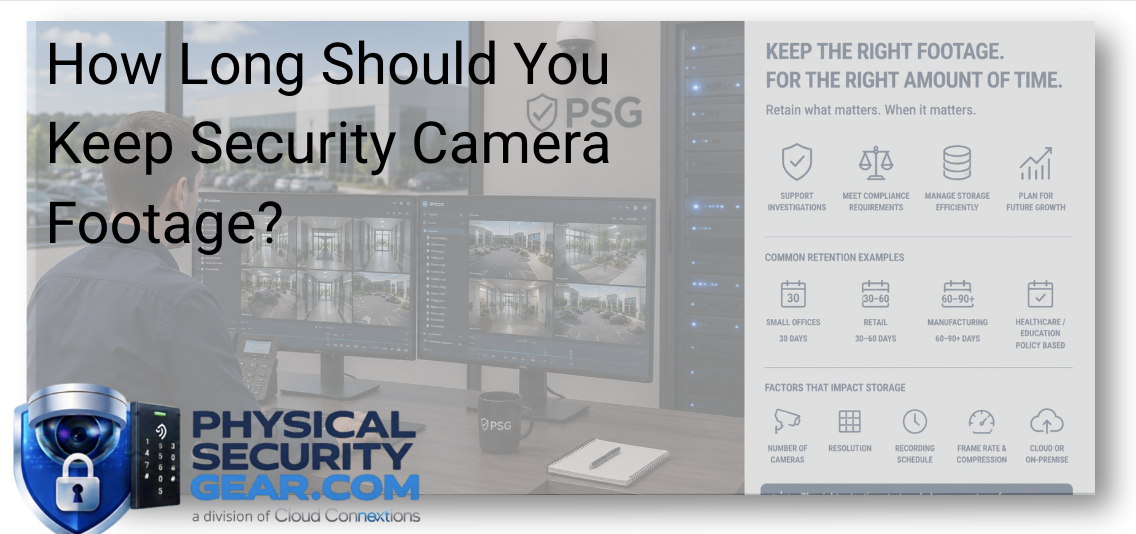
Common examples include:
-
Professional offices: Often around 30 days
-
Retail environments: Frequently 30 to 60 days depending on inventory, incidents, and claims
-
Manufacturing facilities: May require longer retention for operational or workplace investigations
-
Healthcare organizations: May follow specific internal policies or regulatory guidance
-
Schools and universities: Often establish retention requirements through district, campus, or security policies
The goal isn't to store video for the longest possible period.
It's to keep footage long enough to support the way your organization operates.
What Determines Security Camera Storage Requirements?
Retention is only one part of storage planning.
The amount of storage your surveillance system needs also depends on:
-
Number of cameras
-
Camera resolution
-
Continuous vs. motion-based recording
-
Recording schedules
-
Frame rate
-
Compression technology
-
AI and event-based recording
-
Cloud vs. on-premise storage
For example, twenty 8MP cameras recording continuously for 90 days require dramatically more storage than ten 4MP cameras recording on motion for 30 days.
That is why camera count alone doesn't tell you how much storage you need.
You need to look at the complete recording environment.
Continuous Recording vs. Motion and Event-Based Recording
More storage isn't always the only solution.
Depending on the application, organizations may be able to extend useful retention by changing how video is recorded.
Continuous recording captures everything but typically requires more storage.
Motion-based or event-driven recording can reduce the amount of unnecessary footage being stored.
AI-powered security platforms can take this further by identifying meaningful events, people, vehicles, activity, or other defined conditions that make recorded footage easier to search and manage.
The right approach depends on the facility and what the cameras are being used to protect or investigate.
Plan for More Than Today's Camera Count
A storage system that works today may not be enough two or three years from now.
Before selecting storage, consider:
-
Will additional cameras be added?
-
Will higher-resolution cameras replace existing models?
-
Are additional locations planned?
-
Could retention requirements change?
-
Will new analytics or security capabilities be introduced?
-
Will multiple facilities eventually need centralized management?
Building some room for growth now can help prevent an unnecessary storage redesign later.
A Common Storage Misconception
Increasing video retention doesn't always mean simply installing a larger hard drive.
Retention can affect the entire surveillance architecture.
Depending on the environment, the better answer could involve:
-
Increasing available storage
-
Changing recording schedules
-
Adjusting camera resolution where appropriate
-
Using motion or event-based recording
-
Evaluating cloud storage
-
Combining local and cloud-based storage
-
Selecting cameras and platforms with more efficient recording capabilities
The objective should be to keep the footage your organization needs without paying to store large amounts of video that provide little operational value.
One Question to Ask Before Choosing a Retention Period
Ask:
When was the last time your organization needed to retrieve surveillance footage?
Then ask how long it took before someone realized the footage was needed.
That answer can be more useful than starting with, “Do we want 30, 60, or 90 days?”
If most incidents are investigated within a few days, one recording strategy may work.
If issues regularly surface several weeks later, the requirements change.
Your retention period should reflect how incidents actually develop inside your organization.
What to Know Before Selecting Your Storage and Recording Setup
Before purchasing cameras, recorders, or storage, answer a few basic questions:
-
How many cameras will be installed?
-
What resolution will they record?
-
Is continuous recording necessary?
-
Could motion or event-based recording work?
-
How long does footage need to remain available?
-
Are there internal, legal, or compliance requirements?
-
How frequently is recorded video retrieved?
-
Will the system serve one location or multiple facilities?
-
Are cloud, on-premise, or hybrid systems being considered?
-
How much growth is expected over the next several years?
Those answers make it much easier to select cameras, recording infrastructure, and storage that fit the actual application.
The Bottom Line
Video retention isn't about keeping footage forever.
It's about keeping the right footage for the right amount of time while balancing security needs, storage requirements, system performance, and budget.
A well-planned surveillance system should give your organization access to important evidence when it is needed without creating unnecessary storage costs.
Building or Upgrading a Video Surveillance System?
If you already know the type of surveillance equipment you need, explore the video security solutions available through PhysicalSecurityGear.com.
Not sure how camera count, resolution, recording method, and retention requirements affect what you should buy?
Tell us a little about your facility and what you're trying to protect, and our team can help you narrow down the cameras, recording, and storage requirements that fit the application.
Continue Your Research
-
Ultimate Guide to Commercial Video Surveillance
-
Cloud Video Recording Explained
-
2MP vs. 4MP vs. 8MP Security Cameras
-
AI Security Cameras Explained
-
How Much Does Commercial Access Control Cost?
-
Budgeting a Commercial Physical Security Project