
How Many Security Cameras Does My Building Actually Need?
Posted by Doug Beck: Physical Security Gear on 9/10/2026
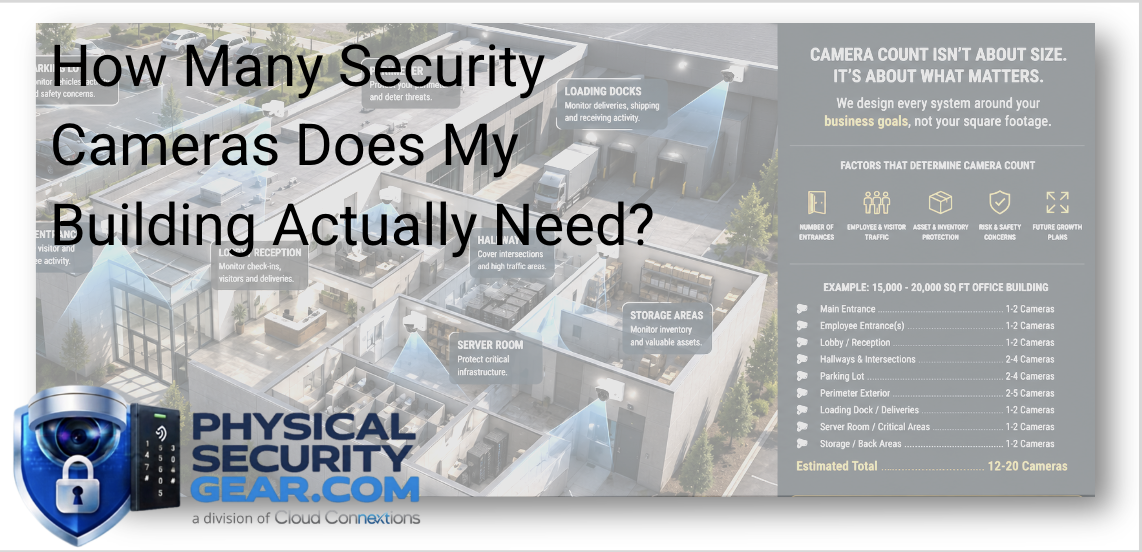
Why Camera Count Depends More on What You Need to See Than the Size of Your Building
Written by Doug Beck
One of the first questions we hear when someone starts planning a commercial surveillance system is:
“How many cameras do we need?”
Usually, the next piece of information they give me is the square footage.
That helps me understand the building, but it does not tell me how many cameras I would recommend.
I can walk through two buildings that are nearly identical in size and come away with completely different camera plans.
One may have a single controlled entrance, an open floor plan, and very little exterior activity. The other may have multiple employee entrances, loading docks, inventory areas, parking lots, restricted spaces, and delivery traffic happening throughout the day.
Same square footage.
Completely different security needs.
For me, the better place to start is:
What are you trying to see, protect, verify, or investigate?
Once we know that, the camera count starts making much more sense.
I Start With the Areas That Matter Most
Before we talk about camera models, resolution, or quantity, I want to understand how the property actually works.
Where do employees enter?
Where do visitors arrive?
Where are deliveries made?
Where is valuable equipment or inventory stored?
Are there areas where employees work alone?
Where have problems happened before?
If something went missing tomorrow, which areas would you immediately want footage from?
Those questions tell me much more than the number on the building plans.
For most facilities, we are trying to identify the areas where visibility has real value rather than simply trying to cover every square foot.
Every Camera Should Have a Job
One thing I try to avoid is installing cameras simply because there is an open spot on the ceiling.
Every camera should help answer a specific question.
For example:
Who entered the building?
That camera needs to be positioned where we can actually capture useful facial detail, not just the top of someone's head as they walk through the door.
What vehicle came onto the property?
That may require a completely different angle, lens, or camera than the one being used to watch the parking lot generally.
Who accessed a restricted area?
Now I am thinking about how video could work alongside access control rather than treating the systems separately.
What happened at the loading dock?
I may need to see employees, drivers, vehicles, packages, and activity around the dock doors.
That is the mentality I would use throughout the project:
What does this camera need to tell us when something happens?
Field Note: Coverage and Identification Are Not the Same Thing
This is an important distinction.
A camera may technically “see” an entrance from 80 feet away.
That does not necessarily mean it gives you the detail you need to identify the person walking through it.
I see this come up when organizations focus heavily on getting the widest possible view.
Wide coverage is useful.
But sometimes the investigation requires detail.
That is why one camera overlooking an entire lobby may not replace a properly positioned camera specifically covering the entrance.
The right question is not simply:
Can the camera see the area?
It is:
Can the camera capture the information we expect to get from that area?
Which Areas Usually Deserve Attention?
Every property is different, but commercial projects commonly make us look closely at:
- Main entrances and exits
- Employee entrances
- Reception and lobby areas
- Parking lots
- Vehicle entrances
- Loading docks
- Shipping and receiving
- Hallway intersections
- Stairwells
- Warehouses
- Server and IT rooms
- Cash-handling locations
- Restricted-access areas
- Exterior perimeters
- Delivery and drop-off areas
That does not mean every facility needs cameras in every one of these locations.
The building and its workflows should determine that.
If you are already evaluating hardware, you can explore our commercial Video Security solutions for indoor, outdoor, perimeter, parking, and specialty applications.
Work Backward From the Incident
One of my favorite ways to evaluate a surveillance plan is to imagine something has already happened.
A package disappears.
A vehicle is damaged.
Inventory goes missing.
Someone enters an area they should not be in.
An employee is injured.
A customer says something happened in the parking lot.
Now ask:
What would we need to see to understand what happened?
Could you identify the person?
Could you follow where they went?
Could you determine which vehicle was involved?
Could you see the interaction clearly enough to understand it?
Could you establish when it happened?
That exercise often exposes blind spots much faster than simply looking at a floor plan and adding camera icons.
Camera Placement Usually Matters More Than Camera Count
I would rather have fewer cameras that are positioned intentionally than more cameras that give me duplicate or unusable views.
Poor placement can create:
- Blind spots
- Excessive overlap
- Faces that are too small to identify
- Backlighting
- Poor nighttime images
- Vehicles captured at unusable angles
- Obstructed views
- Cameras mounted too high for the job they are expected to do
Before determining camera quantity, I want to think about:
- Traffic patterns
- Field of view
- Distance
- Lighting
- Mounting height
- Building architecture
- Interior versus exterior conditions
- Image detail
- Future changes to the property
The quantity usually becomes clearer after those decisions.
Best Practice: Walk the Property
Floor plans are extremely helpful.
They are not a substitute for understanding the actual environment.
When possible, I want to know what the property looks like in real life.
Where are the shelves?
Where do trucks park?
Which door do employees actually use even though the floor plan calls another door the “main entrance”?
Where does morning sunlight hit the camera?
Which areas are dark at night?
Has furniture changed the sight line?
Where are people likely to stand?
A building rarely behaves exactly the way a drawing suggests it will.
That is one reason I am hesitant to give someone a camera count based only on square footage.
Don't Assume Every Room Needs a Camera
More cameras do not automatically mean better security.
There are environments where extensive interior coverage is appropriate.
There are others where I would rather put the budget into better cameras and better placement around critical entrances, parking areas, loading docks, restricted spaces, and high-value assets.
The objective is not maximum camera count.
It is maximum useful visibility.
If a camera is not helping you prevent, verify, or investigate something that matters, I would ask why it is there.
Camera Type Can Change the Entire Layout
This is another reason camera count cannot be determined in isolation.
Different cameras solve different problems.
Depending on the application, we may consider:
Dome Cameras
Often useful in commercial indoor environments and areas where a discreet, compact camera makes sense.
Explore Dome Cameras.
Bullet Cameras
Often used where a more focused exterior view is needed, such as building perimeters, driveways, loading areas, or parking applications.
Fisheye Cameras
Useful when broad panoramic coverage is more important than focusing on one narrow area.
Explore Fisheye Cameras.
Multi-Sensor Cameras
These can be very useful when we need to cover several directions from one mounting location.
Explore Multi-Sensor Cameras.
PTZ Cameras
Helpful in applications where operators may need the ability to change the view, zoom in, or monitor a larger exterior environment.
Explore PTZ Cameras.
The point is not that one camera type is better than another.
The camera needs to fit the job.
Sometimes a wider or multi-sensor approach can reduce the number of devices.
Other times, I would rather use multiple cameras because we need more detail from specific directions.
Field Note: Don't Try to Make One Camera Do Five Jobs
This is another mistake I see.
A single camera gets positioned in a location and is expected to:
- Identify everyone entering
- Watch the entire lobby
- Cover two hallways
- See the reception desk
- Capture activity outside the glass doors
Technically, some of that may appear in the image.
But when an incident happens, the detail you need may not be there.
Sometimes one well-placed overview camera plus another camera specifically designed for identification gives you far more useful information.
Trying to make every camera do everything usually creates compromises.
Video Should Work With the Rest of the Security System
I also wouldn't plan cameras without thinking about the other systems around them.
Video may eventually work alongside:
- Access Control
- Alarms and Intrusion Detection
- Intercom
- Visitor management
- License plate recognition
- Vehicle detection
- People analytics
- Multi-location management
For example, if access control tells us that a credential was used at a restricted door at 10:42 PM, having the right camera positioned at that entrance makes the access event considerably more useful.
The systems should help tell the same story.
Think About Vehicles Differently
Parking lots and vehicle entrances deserve their own conversation.
Watching a parking area generally is different from trying to determine:
- Which vehicle entered
- Which direction it traveled
- Where it parked
- Whether a specific license plate can be captured
- What happened around the vehicle
Camera angle, distance, movement, lighting, and the information you expect to capture all matter.
If vehicles are part of your security concern, mention that early in the planning process.
Do not assume a general parking-lot camera automatically solves a vehicle-identification problem.
What About Analytics?
Modern video systems can do considerably more than simply record footage.
Depending on the platform and camera, organizations may be evaluating capabilities involving:
- People detection
- Vehicle detection
- Search
- Motion events
- Behavioral or object-based analytics
- License plate workflows
- Alerts
- Centralized multi-site management
Those capabilities can influence camera placement too.
If there is an operational goal behind the analytics, tell us before the cameras are selected.
Again, start with:
What are we trying to know?
Then choose the technology.
Questions I Would Ask Before Recommending a Camera Count
If you asked me how many cameras your building needs, I would want answers to questions like:
- How many entrances and exits matter?
- Where do employees enter?
- Where do visitors enter?
- Are deliveries involved?
- Are there loading docks?
- What assets are most important?
- Are parking lots included?
- Do you need vehicle identification?
- Are there restricted areas?
- What incidents are you most concerned about?
- Are there existing cameras we can reuse?
- Will access control be involved?
- Do you need analytics?
- Is this one building or several?
- Are renovations or expansions planned?
- How long do you need to retain recorded video?
Once we understand those pieces, we can start talking intelligently about cameras.
Before that, a number is mostly a guess.
The Bottom Line
There is no formula that says a 20,000-square-foot building needs 12 cameras and a 50,000-square-foot building needs 25.
I would not want to design a surveillance system that way.
Start with the areas that matter.
Understand what you would need to see if something happened.
Determine where identification matters versus general coverage.
Then choose the camera types and positions that give you useful information.
The goal is not to install more cameras.
It is to make sure the cameras you install can answer the questions that matter when you need them.
Already Know What You Need to Cover?
Explore our commercial Video Security cameras and surveillance solutions and compare the options available for different applications.
Not Sure Which Cameras Fit?
Use the chat on our site and tell us a little about the facility.
A few details about the entrances, parking, loading areas, building layout, and what you are trying to protect can help us start narrowing the camera types and coverage approach before you buy.
If you are comparing camera types or capabilities, ask us about that too. Depending on what we have available, our team may be able to show a relevant or comparable solution in action and help explain the differences that matter for your application.
You do not need to have the entire surveillance design figured out before asking for help.
Continue Your Research
- Ultimate Guide to Commercial Video Surveillance
- What Makes a Commercial Security Camera Different?
- 2MP vs. 4MP vs. 8MP Security Cameras
- Cloud Video Recording Explained
- How Long Should You Keep Security Camera Footage?
- AI Security Cameras Explained
- Budgeting a Commercial Physical Security Project