
Should Your Security Cameras and Access Control Work Together?
Posted by Ryan Pinke: Physical Security Gear on 9/22/2026
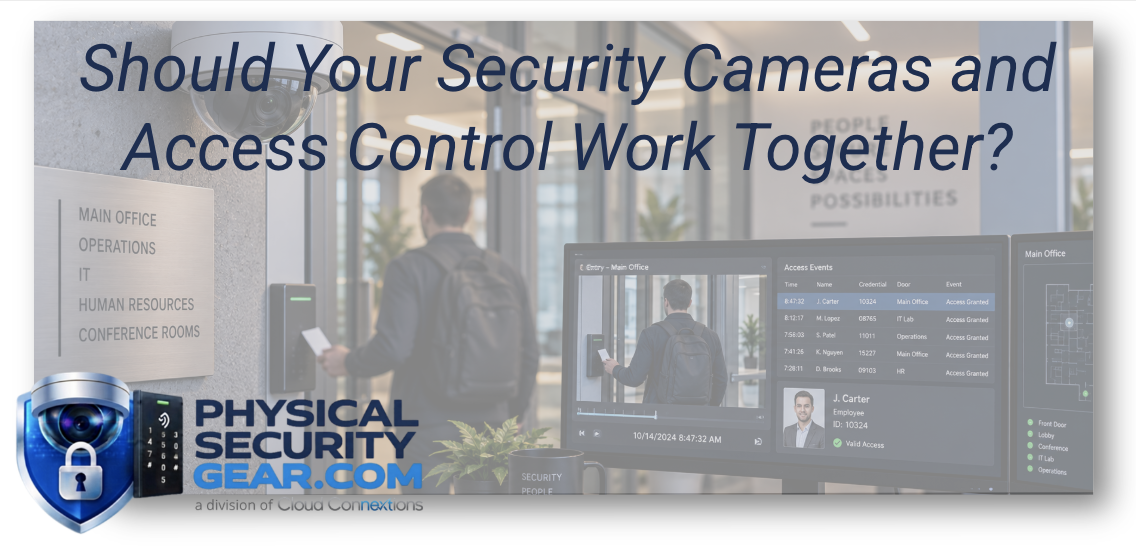
Integration Can Make Investigations Faster, but Only If It Solves a Real Workflow Problem
Written by Ryan Pinke
Security cameras answer one type of question.
What happened?
Access control answers another.
Who was allowed through the door?
When those systems operate independently, an investigation often means opening two different platforms and trying to reconstruct the same event manually.
A door opened at 8:47 PM.
Which credential was used?
Was the person who entered actually the person assigned to that credential?
Where did they go after entering?
Did anyone follow them through the door?
Did they leave through the same entrance?
The access control system may have part of the story.
The camera system may have another part.
Connecting the two can make that story much easier to understand.
But integration should not be the goal by itself.
The goal should be solving a better security and operational workflow.
Start With the Investigation
If I were evaluating whether cameras and access control should work together, I would start with an incident.
Imagine your security team gets this report:
Someone entered a restricted area last night, and we need to know who it was.
In a disconnected environment, the investigation might look like this:
Pull the access control report.
Find the door.
Find the timestamp.
Identify the credential.
Open the video platform.
Find the correct camera.
Navigate to the same timestamp.
Review the footage.
Compare what the credential says happened with what the camera shows.
That works.
But it requires someone to manually connect the systems.
An integrated workflow may allow the access event and relevant video to appear together.
Now the investigation moves faster.
That is the value I care about.
Access Logs Tell You What the System Recorded
An access event may tell you that:
Employee credential 2478 opened Door 6 at 8:47 PM.
That is useful information.
But it does not necessarily tell you:
Who physically walked through the door.
Whether another person followed behind them.
Whether the door was held open.
Whether the employee handed their credential to someone else.
Whether someone entered and immediately left.
Video provides context around the access event.
That is why the two systems can become much more useful together.
If you are still planning the access-control side of the environment, start with What Do You Actually Need for a Commercial Access Control System?.
Video Without Access Data Has Its Own Limitations
Now look at the same event from the camera side.
You see someone enter the building.
You can see what they look like.
But who are they?
Were they authorized?
Which credential opened the door?
Should that credential have worked at that time?
Was access granted normally, manually, or unexpectedly?
That information may live in the access-control system.
Neither system is incomplete on its own.
They simply answer different questions.
The integration becomes valuable when your team needs both answers at the same time.
Ryan's Perspective: Connect Workflows, Not Technology for Technology's Sake
It is easy to look at an integration list and think:
If these systems can connect, they should.
I do not think that is always true.
Integration adds the most value when it reduces friction in a workflow that actually matters.
For example:
A security team frequently investigates after-hours door activity.
That is a strong use case.
An organization wants video associated automatically with forced-door events.
Another strong use case.
A company has 100 locations and wants one team to investigate security events remotely.
Now integration may have significant operational value.
But if nobody reviews access events and the cameras are only used occasionally after an incident, a complicated integration may not create much additional value.
Define the workflow first.
After-Hours Events Are a Natural Place to Start
One of the most useful integrations is around activity outside normal business hours.
Imagine a badge is used at 1:13 AM.
The access-control system may know:
Which door opened.
Which credential was presented.
Whether the access attempt was accepted or denied.
Video may immediately show:
Who was standing there.
Whether they entered alone.
Which direction they went.
Whether a vehicle was nearby.
Whether the activity looked normal.
Instead of starting an investigation from scratch, the security team begins with context.
Forced Doors Become More Useful Events
Another example is a forced-door alert.
The access-control system detects that a door opened without the expected credential event.
That tells you something needs attention.
Video can help answer the next question:
Why?
Maybe an employee pushed the door open improperly.
Maybe a delivery driver caught it before it closed.
Maybe someone intentionally bypassed the access-control process.
Maybe the door hardware malfunctioned.
The alarm matters.
The video helps determine what response is appropriate.
Door-Held-Open Events Can Tell a Similar Story
A door-held-open alert can mean many things.
Someone may be carrying boxes.
A vendor may be making a delivery.
Employees may be moving equipment.
Or someone may have intentionally propped the door open.
Without visual context, the access-control event tells you only that the door remained open longer than expected.
With video, the organization can often determine whether there is a security issue without sending someone to investigate every alert physically.
That can become very valuable across a large facility or multiple locations.
Credential Choice Matters Too
If access control is being redesigned anyway, credential strategy should be part of the conversation.
Organizations may use:
- Cards
- Key fobs
- Mobile credentials
- Other credential types depending on the platform
The right choice depends on the workforce, security requirements, administration, and user experience.
We covered that decision in Key Cards, Fobs, or Mobile Credentials: Which Access Credential Is Right for Your Business?.
The credential creates the access event.
Video can help validate what physically happened around that event.
Integration Can Improve Remote Security Operations
This becomes more important as organizations add locations.
Imagine a security team responsible for 30 offices.
They receive an alert from a location hundreds of miles away.
Without video, they may need to call someone at the site.
Is there a problem?
Can someone check the door?
Who is in the building?
With integrated video and access information, the central team may be able to evaluate much more of the situation remotely.
That can reduce unnecessary dispatches and help organizations respond faster when something truly requires attention.
One Platform Can Simplify This, but It Is Not the Only Way
Some modern physical security platforms combine video surveillance and access control inside a single management environment.
That can simplify administration and investigations.
But separate systems may also be integrated depending on the platforms involved.
I would not make the decision solely around whether everything comes from the same manufacturer.
I would ask:
Does the integration work reliably?
What events can be connected?
What does the user actually see?
How many systems does an administrator need to manage?
How are permissions handled?
How will the environment scale?
The operating experience matters more than the marketing term “unified.”
Existing Investments Should Not Be Ignored
Suppose you already have 75 cameras that work well.
Now you want to modernize access control.
Do all the cameras need to come out simply because a new platform offers integrated video?
Not necessarily.
That is exactly the kind of decision where I would stop and look at the full environment.
Can existing cameras remain useful?
Can they integrate?
Could migration happen in phases?
Would replacing everything create enough operational value to justify the expense?
Our article Can I Reuse My Existing Security Cameras? goes deeper into that question.
A clean technical architecture is nice.
A financially responsible architecture is better.
Tailgating Is a Good Example of Why Context Matters
Access control typically manages the credentialed person.
But doors are physical.
Someone may present a valid credential and then allow another person through behind them.
The access-control system may show one authorized entry.
Video may show two people entering.
Whether that matters depends on the environment.
At a standard office entrance, it may be common behavior.
At a data center, pharmaceutical facility, restricted manufacturing area, or other high-security environment, it may be significant.
Again, the technology is useful when it supports the organization's actual security policy.
Visitor Management Adds Another Layer
Now consider visitors.
A visitor arrives.
They check in.
Their host is notified.
They may receive temporary building access.
Cameras provide visual context as they move through the facility.
Access expires when the visit ends.
That begins to create a much more complete security workflow.
It is also why I would look beyond the immediate access-control project if visitor management is likely to be part of the roadmap.
You do not necessarily need to purchase every security application at once.
But it is useful to know where the organization is heading before selecting the foundation.
Cybersecurity Becomes More Important as Systems Connect
Integration creates convenience.
It also increases the importance of access to the platforms themselves.
Physical security systems can contain:
- Employee identity information
- Credential records
- Video
- Entry history
- Visitor information
- Administrative permissions
That means system access should be treated seriously.
Who has administrator privileges?
How are accounts removed?
How are devices and software maintained?
How is access monitored?
How are security updates handled?
We covered the larger issue in Why Cybersecurity Matters in Physical Security.
Connecting physical security systems should improve security, not create a management blind spot.
You Probably Do Not Need Video on Every Access Event
This is another place where I would avoid overbuilding.
If thousands of employees move through doors every day, nobody wants to manually review video for every valid access event.
Integration is more valuable when it helps highlight exceptions.
For example:
Denied access.
Forced doors.
Doors held open.
After-hours activity.
Activity involving sensitive spaces.
Other events your organization has decided deserve attention.
The goal is not to create more alerts.
The goal is to make the important ones easier to investigate.
Think About Who Actually Uses the System
IT may administer the platform.
Security may investigate incidents.
Facilities may need door-status information.
HR may become involved in specific investigations.
Reception may interact with visitors.
Different users need different things.
Before selecting a platform, I would understand who needs access and what they actually need to do.
A system that looks impressive during a demonstration can become frustrating if every normal task requires five clicks, two platforms, and a phone call to IT.
Workflow matters.
Multi-Location Organizations Should Decide What Gets Standardized
If you operate many facilities, I would not necessarily insist that every building have identical hardware.
I would standardize the things that matter operationally.
For example:
How users are administered.
How access events are categorized.
How video is retrieved.
How after-hours events are handled.
How permissions are assigned.
How incidents are escalated.
How new locations are added.
That creates consistency without forcing every property into the same equipment list.
Cameras Still Need to Be Designed Correctly
Integration does not fix bad camera placement.
If the camera associated with an access-controlled door cannot clearly see the person entering, connecting it to the access-control system does not make the footage more useful.
The camera still needs the right:
- Position
- Field of view
- Lighting
- Resolution
- Distance
The access event can get you to the right timestamp.
The camera still needs to provide the evidence.
That is why video design and access-control design should be coordinated when the systems are expected to work together.
The Most Important Doors May Deserve the Best Integration
You may not need the same level of integration everywhere.
Start with higher-risk locations.
That could include:
Executive areas.
Server rooms.
Inventory rooms.
Pharmacy or medication storage.
Loading entrances.
Employee-only doors.
Sensitive production areas.
Restricted records.
The specific areas will depend on the organization.
If video-linked access events create meaningful value there, expand the strategy from those locations.
The Bottom Line
Security cameras and access control do not have to operate together.
But when investigations frequently require both systems, connecting them can create real operational value.
Access control tells you:
What the system allowed.
Video tells you:
What physically happened.
Together, they can make it easier to evaluate:
Denied entries.
After-hours activity.
Forced doors.
Held-open doors.
Unauthorized follow-through.
Sensitive-area access.
Incidents across remote locations.
The goal is not integration for its own sake.
The goal is giving your security team the information it needs without making them manually rebuild the same event across several systems.
Planning Video and Access Control Together?
Tell us what you already have.
Helpful information includes your current camera platform, access-control system, number of doors, number of cameras, locations involved, and the types of security events your team needs to investigate.
We can help determine whether keeping the systems separate, integrating existing platforms, or moving toward a more unified architecture makes sense.
Explore Access Control and Video Security to start evaluating the technology behind each side of the system.
For larger deployments involving multiple facilities, infrastructure, migration planning, installation, or long-term standardization, Cloud Connextions can help evaluate the complete physical security environment.
Continue Your Research
- What Do You Actually Need for a Commercial Access Control System?
- Key Cards, Fobs, or Mobile Credentials: Which Access Credential Is Right for Your Business?
- Why Cybersecurity Matters in Physical Security
- Can I Reuse My Existing Security Cameras?
- How Many Security Cameras Does My Building Actually Need?
When access control tells you who should have entered and video shows you who actually did, the investigation gets a lot easier.