
Highlights
- Switches five USB peripherals and one HDMI display between three hosts, supporting installed room-computer and guest-laptop workflows.
- Extends the connection between room-side and table-side hubs over CAT6A U/FTP via HDBaseT 3.0—up to 132 ft at 4K60 or 230 ft at 1080p60.
- Supports a one-cable USB-C laptop connection with DisplayPort Alt Mode, USB 2.0, and up to 100 W charging.
- Provides automatic or manual host switching, including a front-panel host-selection button.
- Offers integration and management options through RS-232, GPI, LAN/IP, and USB control, with REST API, Telnet, and preloaded MAESTRO LAN web-page functionality.
- Supports under-table or wall mounting with included brackets and mounting hardware.
Ideal For
- Large boardrooms with a room PC/display location separate from the conference table
- Classrooms and auditoriums that need table-side laptop access to installed USB peripherals and a display
- BYOD/BYOM rooms where users need to switch between an installed room system and connected laptops
- Deployments that need under-table or wall-mounted switching hubs with centralized control options
Resources
Inogeni TOGGLE ROOMS XT 3-Host USB/HDMI Switcher with Extension
The Inogeni TOGGLE ROOMS XT is built for large boardrooms, classrooms, and auditoriums where the room PC and display are located away from the table-side laptop connection. Its two-hub design places the Room PC hub near the room system and display, while the Laptop hub can be mounted at or beneath the table. It switches five USB peripherals and one HDMI display among three hosts, giving room users a practical way to move between the installed room computer and connected laptops. For guest use, the Laptop hub supports a single USB-C connection carrying USB 2.0 and DisplayPort Alt Mode while providing up to 100 W of charging; USB-B plus HDMI is also supported for laptop connectivity. The hubs connect over CAT6A U/FTP using HDBaseT 3.0, making this configuration a strong fit when table and display-side equipment must be separated. Plan for the required CAT6A U/FTP extension cable as part of the installation, as it is not listed among the included items.
Key Specifications
- Switching capacity: 3 hosts, 5 USB peripherals, and 1 HDMI display
- HDMI video: up to 4K60 in 16:9 or 5K30 in 21:9
- HDMI support: HDMI 2.0b, HDCP 2.3/2.2/1.4, CEC, and 4K-to-1080p downscaling
- Extension link: HDBaseT 3.0 over CAT6A U/FTP; up to 40 m / 132 ft at 4K60 or 70 m / 230 ft at 1080p60
- Room PC hub ports: 3 x USB 3.0 Type-A device ports with 1.8 A shared power
- Laptop hub ports: 2 x USB 2.0 Type-A peripheral ports
- Laptop host connection: USB-C with USB 2.0, DisplayPort Alt Mode, and up to 100 W charging; or USB-B plus HDMI 2.0
- Room PC hub dimensions: 9.88 x 4.56 x 1.28 in (W x L x H); 1.68 lb
- Laptop hub dimensions: 7.24 x 4.56 x 1.28 in (W x L x H); 1.28 lb
- Operating environment: 32 to 113°F (0 to 45°C), 0% to 90% non-condensing humidity
- Made in Canada; TAA compliant; listed certifications include FCC, CE, UKCA, RoHS, IEC62368, and SoV
What's Included
- Room PC device
- Laptop device
- 1.8 m / 6 ft USB-C to USB-C cable
- 1 m / 3 ft USB-A to USB-B cable
- 3 terminal blocks
- Two power supplies
- International adapters
- Mounting brackets and hardware
- PSU mounting hardware
- Rubber feet
- Quick Start Guide and Thank You card
Compatibility
- No driver installation is required for Windows 7 or later, macOS 10.10 or later, and Linux kernel 2.6.38 or later.
- Designed for use with major UC ecosystems and room-device categories, including Teams, Zoom, Google Meet, Webex, USB cameras, videobars, and pro-AV audio devices. Validate the planned room system and peripheral configuration before ordering.
- Use CAT6A U/FTP for the HDBaseT 3.0 link between hubs. The extension cable is not listed as included and should be sourced separately.
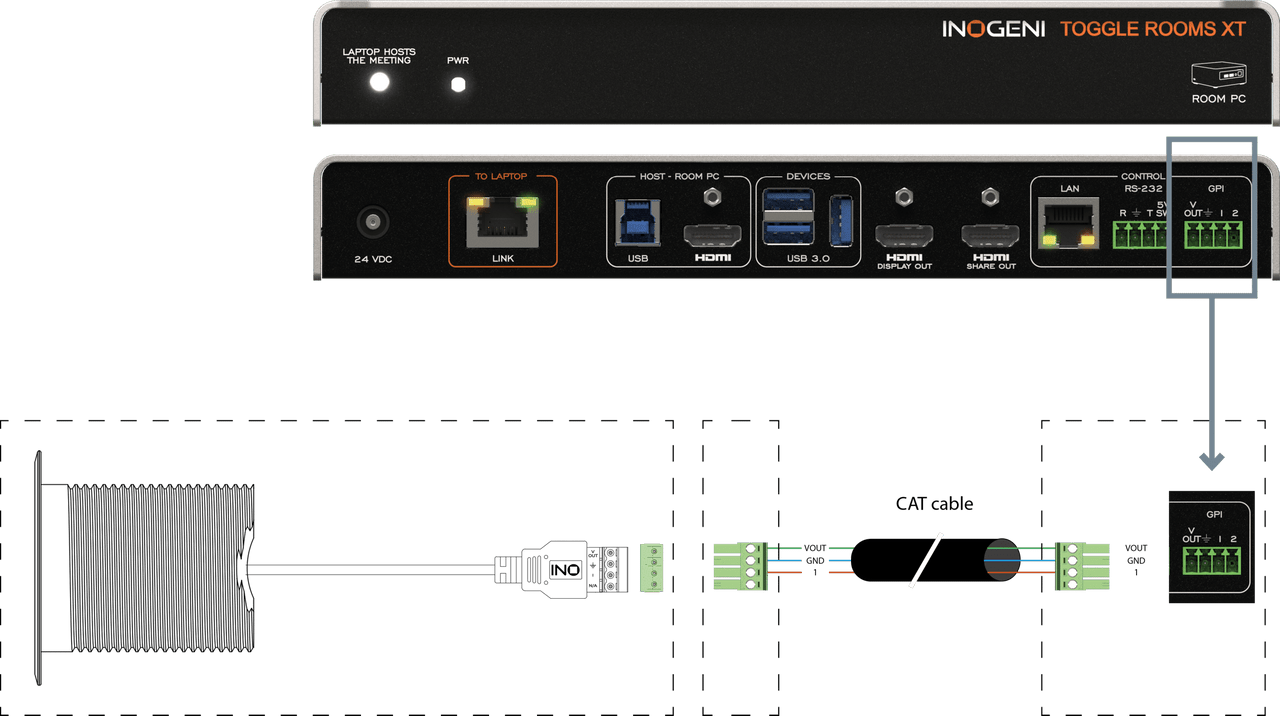
- The optional INO-BUTTON KIT can provide table surface-mounted BYOM laptop/host selection through GPI; it is not included in the base package.
Licensing, Warranty & Support
No driver installation is required. MAESTRO LAN web management is preloaded, and no required software license or recurring subscription is described for switching, configuration, firmware updates, or web management. If a contractual no-subscription requirement is part of your purchase, confirm commercial terms before ordering. Eligible end-user purchases made after August 1, 2024 are covered by Inogeni's limited 5-year warranty; USB cables have a 2-year warranty. Purchases before that date have a 2-year product warranty term. Manufacturer resources include a knowledge base, software tools, compatibility lists, training videos, product registration, and a support-ticket portal. Confirm the planned room computer, display, USB peripherals, CAT6A cable route, control method, and any optional table button before purchase.
VideoConferenceGear.com Assistance
We can help validate the TOGGLE ROOMS XT for your room layout, confirm compatibility with the planned room computer, display, camera, audio devices, and UC platform, and identify the CAT6A extension, accessories, and deployment support needed for a complete installation.
Common Questions
What rooms is the TOGGLE ROOMS XT intended for?
It is intended for larger spaces where room-side equipment and the table-side laptop connection are separated, including large boardrooms, classrooms, and auditoriums. The Room PC hub is placed near the room system and display, while the Laptop hub is located at or under the table.
How many hosts and peripherals can it switch?
The system switches five USB peripherals and one HDMI display between three hosts. The Room PC hub provides three USB 3.0 Type-A device ports, and the Laptop hub provides two USB 2.0 Type-A peripheral ports.
Can a guest connect with one USB-C cable and receive power?
Yes. The Laptop hub supports USB-C with DisplayPort Alt Mode, USB 2.0, and charging up to 100 W. A laptop can also connect using USB-B plus HDMI.
What cable is required between the two hubs?
The extension link requires CAT6A U/FTP cable. It supports up to 40 m / 132 ft at 4K60 or up to 70 m / 230 ft at 1080p60. A CAT6A cable is not listed among the included items, so it should be planned separately.
Is a table-mounted host-selection button included?
No. The INO-BUTTON KIT is an optional accessory that supports table surface-mounted BYOM laptop/host selection through GPI.
Does it require drivers or a recurring subscription?
No driver installation is required. MAESTRO LAN web management is preloaded, and no required license or recurring subscription is described for the system's switching, configuration, firmware updates, or web management.
Warranty Information
Standard Manufacturer WarrantyProduct Videos
Custom Field
Product Reviews
Cloud Connextions Nationwide Services - Design, Installation & Support - A Partner You can Trust
Cloud Connextions specializes in delivering next-generation office technologies, including physical security, video conferencing, and ProAV solutions. As a valued partner for the design, integration, and support of these systems, we work with industry leaders like Verkada, Zoom, AVer, Crestron, Poly, and more. Our team ensures you receive top-quality products and seamless service. VideoConferenceGear.com is our trusted online source, where you’ll find rigorously tested products backed by our extensive expertise in creating customized technology solutions for modern office environments.