
Highlights
- Connects a laptop to installed room AV peripherals and an HDMI display for a wired BYOD meeting workflow.
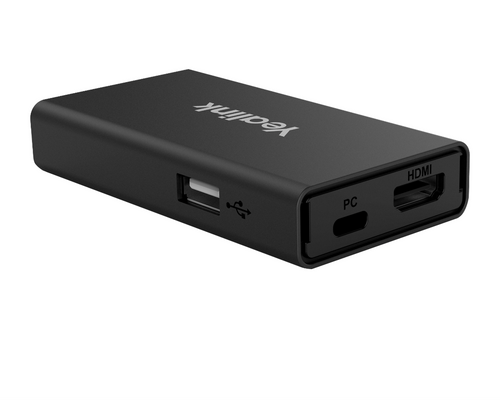
- Two USB 3.0 Type-A ports support connections to compatible room USB peripherals, while the HDMI output connects the room display.
- Keeps the room system modular, so the camera, speakerphone, display, and laptop can be selected for the planned space.
- Includes Velcro attachment strips for mounting the hub on top of or underneath a table.
Ideal For
- Huddle rooms using a laptop-based BYOD meeting workflow
- Meeting spaces with installed Yealink USB room peripherals and an HDMI display
- Organizations that want a modular room AV setup instead of a complete all-in-one conferencing system
- Tabletop or under-table installations where a dedicated laptop connection point is useful
Resources
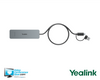
Yealink BYOD-BOX Wired BYOD Connectivity Hub
The Yealink BYOD-BOX is a practical fit for huddle rooms and meeting spaces where teams want to connect a laptop to the room’s installed AV equipment rather than rely on a dedicated conferencing computer. It provides a wired connection point for supported room peripherals and a display, helping keep the room setup modular while allowing users to bring their preferred conferencing application on their laptop. This is an accessory, not a complete conferencing system. Plan to pair it with the camera, microphone/speaker, display, and laptop appropriate for the room. Yealink specifically recommends the UVC40E2 with BYOD-BOX for huddle-room use, while its connection guidance also depicts a UVC30 Room camera and CP900 speakerphone setup. The enclosure can be attached to the top or underside of a table for a more intentional installation.
Key Specifications
- Manufacturer part number: 1300004
- Internal SKU: BYOD-BOX
- Standalone wired BYOD conference-room USB connectivity hub/accessory
- Ports: 1 x HDMI output, 2 x USB 3.0 Type-A, 1 x USB Type-C power port
What's Included
- BYOD-BOX
- PD power adapter
- USB Type-C cable
- 2 x Velcro attachment strips
- Type-C-to-Type-A adapter
- Quick Start Guide
Compatibility
- Yealink’s BYOD solution identifies laptop use with Windows, Mac, and Chromebook devices.
- Yealink documents use with its USB-room solutions and shows connections with UVC30 Room and CP900 peripherals; it also recommends UVC40E2 with BYOD-BOX for huddle rooms.
- Validate third-party USB cameras and speakerphones before purchase. Universal compatibility with non-Yealink peripherals should not be assumed.
- An HDMI cable for the room display should be planned separately unless it is explicitly included in the selling bundle.
- Confirm the supplied laptop-cable length for fixed-table installations. Documentation varies between 1.2 m and 1.5 m depending on the material and bundle.
Licensing, Warranty & Support
For Yealink’s USB Bar plus BYOD-BOX workflow, no Yealink room license, conferencing-platform account, or additional software is required. Any licensing or subscription required by the Teams, Zoom, or other conferencing service selected for the laptop remains separate. Yealink lists BYOD Kits with a 24-month warranty, subject to its policy, proof-of-purchase requirements, and authorized-channel purchase. Optional management platforms may be available within Yealink’s broader BYOD ecosystem, but they are not presented as a required BYOD-BOX subscription. Confirm the complete room peripheral list, display connection, HDMI cable, and exact cable length before ordering.
VideoConferenceGear.com Assistance
We can help confirm the BYOD-BOX fits your room, validate the planned laptop and peripheral connections, and select the camera, audio, display, accessories, and conferencing-service licensing needed for a complete deployment. We can also coordinate nationwide installation and ongoing support.
Common Questions
Is the BYOD-BOX a complete conferencing system?
No. It is a standalone connectivity hub. You will need separate room components, including a camera, microphone/speaker, display, and laptop. It is intended to connect the laptop with installed room AV equipment.
What ports does it have?
The hub has one HDMI output, two USB 3.0 Type-A ports, and one USB Type-C port used for the PD power adapter.
Is an HDMI cable included?
The included-items list does not include an HDMI cable. Plan for a stable 1.8 m HDMI cable with a magnetic ring for the display connection unless your specific selling bundle explicitly includes one.
Does it require a Yealink room license or additional software?
No Yealink room license, platform account, or additional software is required for Yealink’s USB Bar plus BYOD-BOX workflow. Any subscription needed for your chosen conferencing service is separate.
Will it work with any USB camera or speakerphone?
Do not assume universal third-party peripheral support. Yealink documents its own USB room peripherals, including UVC30 Room and CP900. Validate non-Yealink equipment in the intended deployment before purchase.
What warranty applies?
Yealink lists BYOD Kits with a 24-month warranty, subject to its warranty terms, proof of purchase, and authorized-channel purchase requirements.
Warranty Information
Standard Manufacturer WarrantyProduct Videos
Custom Field
Product Reviews
Cloud Connextions Nationwide Services - Design, Installation & Support - A Partner You can Trust
Cloud Connextions specializes in delivering next-generation office technologies, including physical security, video conferencing, and ProAV solutions. As a valued partner for the design, integration, and support of these systems, we work with industry leaders like Verkada, Zoom, AVer, Crestron, Poly, and more. Our team ensures you receive top-quality products and seamless service. VideoConferenceGear.com is our trusted online source, where you’ll find rigorously tested products backed by our extensive expertise in creating customized technology solutions for modern office environments.