Highlights
- Wired auxiliary screen-sharing box for Yealink MVC systems, separate in design from the Touch Console.
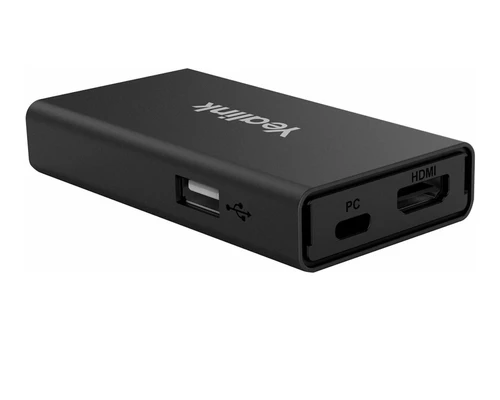
- Three connection ports: USB Type-B, HDMI in, and USB-C, for broad device compatibility.
- Bicolor LED status indicator shows the casting status of the wired auxiliary stream.
- Compact size allows discreet placement, including hidden integration within conference desks.
- Deploys in proximity to a presenter when the MTouch Console casting cable does not reach.
- Simplifies integration with HDMI matrix systems for a cleaner table setup.
Ideal For
- Yealink MVC rooms needing a wired auxiliary casting point separate from the Touch Console
- Conference tables where the MTouch Console cable does not reach every seating position
- Rooms integrating with an HDMI matrix for centralized, cable-managed sharing
- Deployments wanting the sharing box concealed within furniture for a clean table appearance
Resources
Yealink MShare E2 Wired MVC Screen-Sharing Box (1306032)
The MShare E2 is a wired screen-sharing box for Yealink MVC video conferencing systems, built with a design separate from the MTouch Console for more flexible placement. When the Touch Console's casting cable does not reach a presenter's position, the compact MShare E2 can be deployed nearby to extend wired casting to that spot, using its USB Type-B, HDMI in, and USB-C ports for broad device compatibility.
A bicolor LED reports the casting status of the wired auxiliary stream, so presenters can confirm the connection at a glance. Its compact footprint allows it to be hidden within the conference desk, keeping the table clean while integrating with an HDMI matrix for centralized routing. Before ordering, confirm the room's Yealink MVC system and Touch Console configuration, and plan cable routing from the presenter position to the MShare E2's mounting location.
Key Specifications
- Manufacturer model: MShare E2 (SKU 1306032)
- Product type: Wired auxiliary screen-sharing box for Yealink MVC systems
- Ports: USB Type-B (female), HDMI in (female), USB-C (female)
- Status indicator: bicolor LED, shows wired auxiliary stream casting status
- Dimensions: 116 mm x 61 mm x 16.8 mm
- Weight: 0.082 kg
- Operating temperature: 0°C to 40°C
- Operating humidity: 10% to 95%
What's Included
- MShare E2 sharing box
- USB-C cable
- HDMI cable
- USB Type-A cable
- Cable tie mounting bases
- Cable ties
- Velcro
- Quick Start Guide
Certifications and Compatibility
- Yealink MVC systems: designed to work alongside the MTouch Console on compatible Yealink MVC video conferencing systems.
- Connectivity: wired only, over USB Type-B, HDMI in, and USB-C. No wireless casting protocol is published by Yealink for this device.
- Distinct product: the MShare E2 is a separate product from the earlier Yealink MShare, which supports the WPP20 wireless pod. The two should not be confused.
- HDMI matrix integration: supports concealment and routing within a room's HDMI matrix setup.
- Compatibility is limited to Yealink-published MVC systems. Confirm current compatibility against Yealink's MVC system documentation for your specific deployment.
Design Considerations
- Confirm the room's MVC system and Touch Console layout before specifying the MShare E2, and plan its placement relative to presenter positions the console cable does not reach.
- Plan cable routing for the USB-B, HDMI, and USB-C connections, using the included cable tie mounts and velcro for a tidy install.
- If concealing the unit within the conference desk, confirm sufficient clearance and access to the ports and LED indicator.
- For HDMI matrix integration, coordinate the MShare E2's connection point with the matrix system's routing plan.
- Confirm this is the correct product; do not substitute the earlier MShare (with WPP20 wireless support) for this wired-only MShare E2, or the reverse.
VideoConferenceGear.com Assistance
We can confirm the MShare E2 is the right auxiliary sharing solution for your Yealink MVC room, and help plan its placement relative to presenter positions the Touch Console cable does not reach. We can advise on cable routing and desk concealment, coordinate integration with an HDMI matrix where applicable, and make sure the correct MShare product is specified rather than the earlier wireless-capable MShare. For multi-room and multi-site programs we can help standardize auxiliary sharing across every MVC deployment.
Common Questions
Does the MShare E2 support wireless casting?
No. Per Yealink's own documentation, the MShare E2 is a wired auxiliary sharing box using USB-B, HDMI, and USB-C connections. Wireless casting via a pod like the WPP20 is a feature of the separate, earlier Yealink MShare product.
Why would a room need this in addition to the Touch Console?
The MShare E2 extends wired casting to a location the Touch Console's own casting cable cannot reach, such as a different seating position or a concealed desk mount point.
Can it be hidden in the conference table?
Yes. Its compact size is designed to allow concealment within the desk for a cleaner table appearance, and it integrates with HDMI matrix systems.
How does it indicate connection status?
A bicolor LED shows the casting status of the wired auxiliary stream.
Which systems is it compatible with?
Yealink MVC video conferencing systems, working alongside the MTouch Console.
Warranty Information
Standard Manufacturer WarrantyProduct Videos
Custom Field
Product Reviews
Cloud Connextions Nationwide Services - Design, Installation & Support - A Partner You can Trust
Cloud Connextions specializes in delivering next-generation office technologies, including physical security, video conferencing, and ProAV solutions. As a valued partner for the design, integration, and support of these systems, we work with industry leaders like Verkada, Zoom, AVer, Crestron, Poly, and more. Our team ensures you receive top-quality products and seamless service. VideoConferenceGear.com is our trusted online source, where you’ll find rigorously tested products backed by our extensive expertise in creating customized technology solutions for modern office environments.