


Highlights
- The dual-camera design combines a wide panoramic view with a controllable PTZ view for more flexible room coverage.
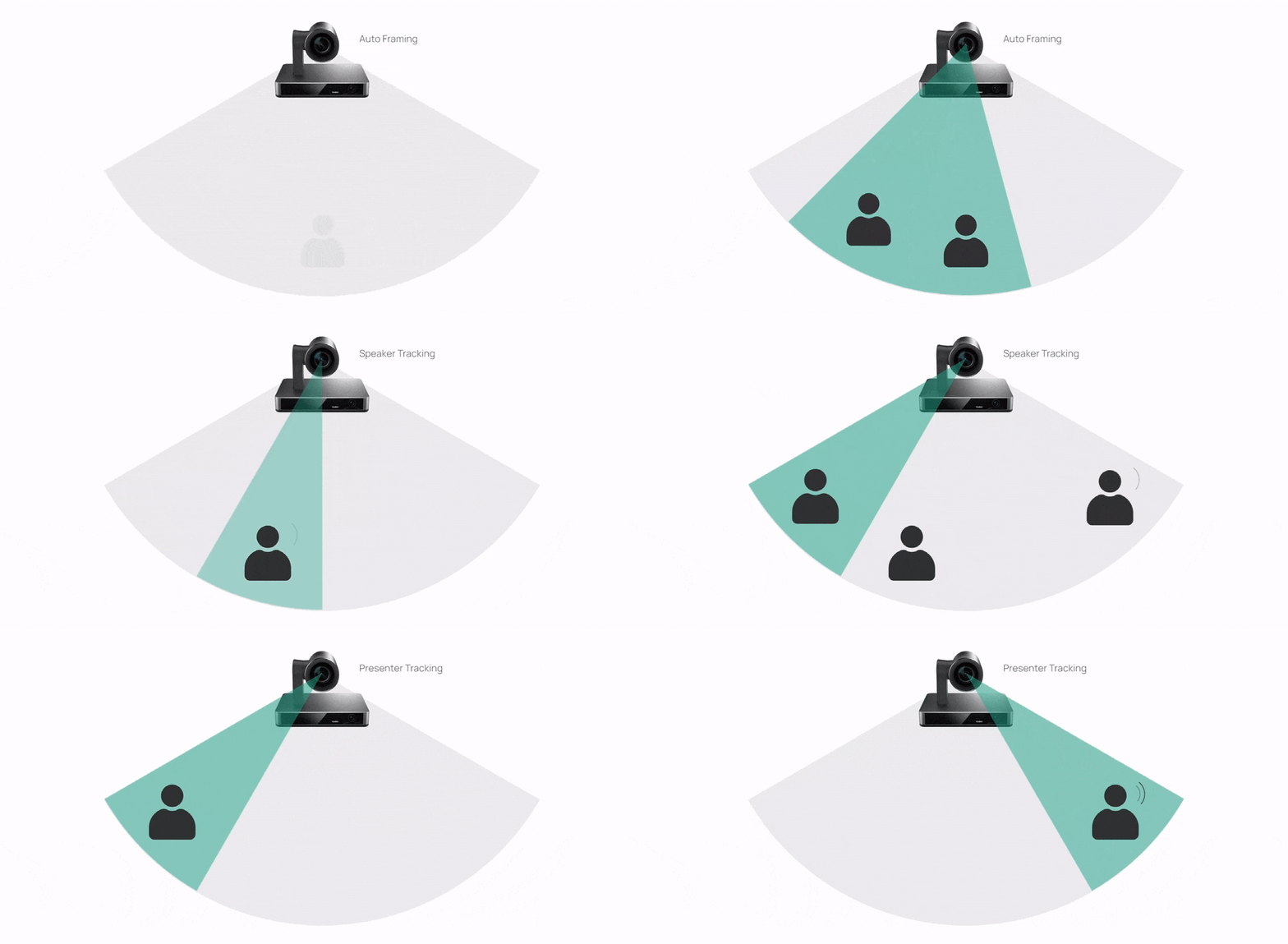
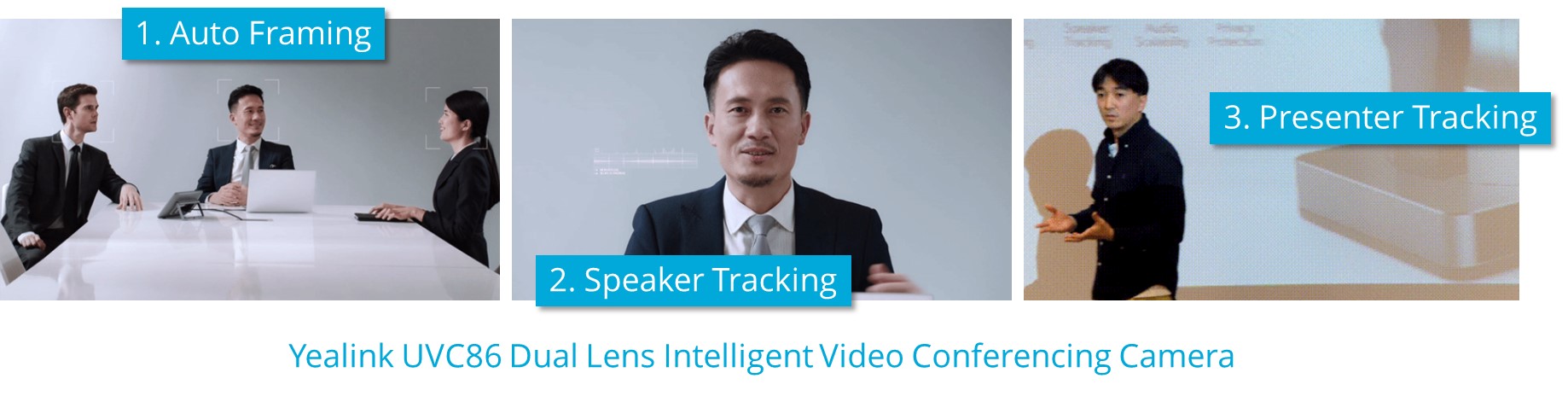
- Auto Framing, Speaker Tracking, Presenter Tracking, Picture-in-Picture, and Multi Focus provide multiple ways to present meeting participants.
- 4K video at 30 fps delivers detailed image capture for compatible conferencing workflows.
- The PTZ camera provides 12x optical zoom, 1.7x digital zoom, and up to 20.4x HD zoom for closer views of participants and presenters.
- Tabletop, display, tripod, wall, and ceiling installation options support a range of room layouts.
- USB connectivity supports use with an external computer, codec, room appliance, or BYOD extender rather than requiring a proprietary all-in-one room system.
Ideal For
- Medium conference rooms with approximately 7–12 participants
- Large conference rooms with approximately 12–20 participants
- Microsoft Teams Rooms deployments using a compatible room system
- Zoom Rooms deployments using a compatible room system
- BYOD meeting spaces that use an external computer or Yealink BYOD extender
- Boardrooms and presentation rooms where speaker or presenter tracking is useful
Resources

Yealink UVC86 4K Dual-Lens Speaker Tracking Camera for Medium and Large Rooms
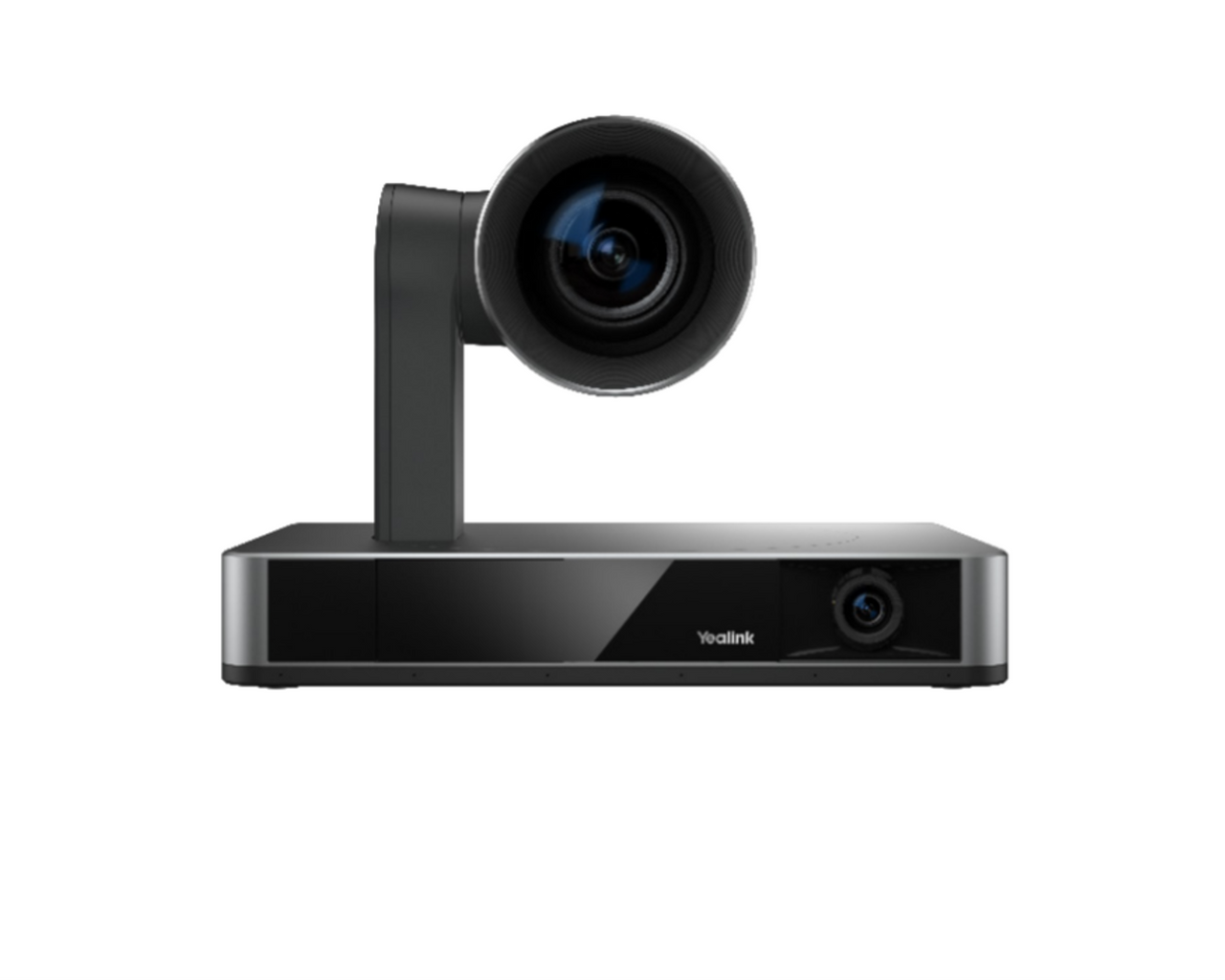
The Yealink UVC86 combines an 8MP Sony PTZ camera and an 8MP Sony panoramic camera in one room peripheral. It captures video up to 4K at 30 fps and uses intelligent framing and tracking modes to show the room, follow the active speaker, or focus on a presenter—making it a strong fit for medium and large conference rooms where participants may be spread across a wide table or presentation area.
This is a camera component rather than a complete room system. It connects through USB to an external computer, room codec, VCS device, MVC system, or compatible BYOD extender, and it can integrate with Yealink audio devices through its VCH port and line-in connection. Plan separately for room compute, displays, microphones, speakers, and meeting-platform licenses as required by your deployment.
The Yealink UVC86 Dual Lens Tracking Camera 4K PTZ Video Conferencing Camera for Medium and Large Rooms
Key Features:
Platform Compatibility

- This is a Teams Rooms peripheral certification and does not make the standalone UVC86 a native Teams Rooms appliance.
- The camera requires a compatible Zoom Rooms computer or appliance; certification does not include a Zoom Rooms compute platform or license.
Key Specifications
- Primary PTZ lens: 8MP Sony camera; up to 3840 x 2160 video at 30 fps
- Primary PTZ lens field of view: 90° DFOV, 81° HFOV, 50° VFOV
- Primary PTZ lens zoom: 12x optical zoom, 1.7x digital zoom, and 20.4x HD zoom
- Primary PTZ lens movement: Pan ±100°; tilt from +40° to -90°
- Primary PTZ lens presets: 9 camera presets
- Secondary panoramic lens: 8MP Sony camera
- Secondary panoramic lens field of view: 120° DFOV, 110° HFOV, 78° VFOV
- Tracking and framing: Auto Framing, Speaker Tracking, Presenter Tracking, Picture-in-Picture, and Multi Focus
- Connections: 1 x USB 3.0 Type-B, 1 x USB 2.0 Type-A, Yealink VCH RJ45, 3.5 mm line-in, HDMI Out, power port, security lock slot, and reset slot
- Power: 48 V DC, 0.7 A power adapter; AC power adapter included
- Dimensions in working position: 210 x 156 x 156 mm (W x D x H)
- Dimensions in sleeping position: 210 x 156 x 183 mm (W x D x H)
- Working height: 156–192 mm
- Net weight: 3.27 kg
- Installation options: Tabletop, TV stand, tripod, wall, ceiling, and top-of-display installation
What's Included
- Yealink UVC86 camera
- VCR20 remote control
- AC power adapter
- 7 m USB cable
- Wall bracket and installation accessories
Compatibility
- Meeting and collaboration platforms: Certified as a Microsoft Teams Rooms peripheral and listed by Zoom as a certified camera; the connected room system or computer provides the platform operation.
- AV and room systems: Connects through USB to an external computer, room codec, VCS device, MVC system, or compatible BYOD extender.
- BYOD: Supported when used with an external personal computer or Yealink BYOD extender; the camera itself is not a complete wireless BYOD system.
- Audio systems: Supports Yealink audio devices through the VCH RJ45 port and 3.5 mm line-in connection.
- Required supporting hardware: A separate computer, room appliance, codec, or other supported conferencing host is required for USB conferencing use.
- Room design: Yealink positions the camera for medium and large rooms; final suitability depends on room geometry, camera placement, and the selected audio design.
- Platform operation: Generic USB compatibility supports meeting applications through an external computer, while exact operation depends on the connected room system and software.
Licensing, Warranty & Support
No product-specific subscription is required for standalone USB camera operation. Microsoft Teams Rooms, Zoom Rooms, and other meeting-platform licenses are separate purchases for the connected room system or computer. The standalone UVC86 does not include an integrated loudspeaker, so plan for separate microphones and speakers or a compatible Yealink audio configuration. Yealink room-design configurations document a 2-year hardware warranty; coverage for the standalone product and purchase region should be confirmed with your order. Yealink provides support resources including ticket submission, equipment maintenance, and partner support.
VideoConferenceGear.com Assistance
We can help validate whether the UVC86 is the right camera for your room, confirm the connected Teams Rooms, Zoom Rooms, or BYOD configuration, and select the room computer, display, audio equipment, accessories, and licensing you need. We can also coordinate installation, nationwide multi-location deployment, and ongoing support for your meeting-room environment.
Common Questions
Is a computer or room codec required?
Yes. The UVC86 is a room camera peripheral and must connect to an external computer, room codec, VCS device, MVC system, or compatible BYOD extender for USB conferencing use.
Does the UVC86 include speakers or microphones?
The standalone UVC86 is primarily a camera and does not have a documented integrated loudspeaker. It supports Yealink audio devices through the VCH port and line-in connection, so separate microphones and speakers or a compatible Yealink audio configuration should be included in the room design.
Is the UVC86 certified for Microsoft Teams and Zoom Rooms?
Yes. It is certified as a Microsoft Teams Rooms peripheral and listed by Zoom as a certified camera. These certifications apply to the camera hardware; a separate room computer or appliance and the applicable platform license are still required.
Can the UVC86 be used in a BYOD room?
Yes, when paired with an external personal computer or Yealink BYOD extender. The standalone camera does not provide a complete wireless BYOD system by itself.
Where can the camera be installed?
The UVC86 supports tabletop, TV stand, tripod, wall, ceiling, and top-of-display installation. A wall bracket and installation accessories are included.
Product Videos
Custom Field
Product Reviews
Cloud Connextions Nationwide Services - Design, Installation & Support - A Partner You can Trust
Cloud Connextions specializes in delivering next-generation office technologies, including physical security, video conferencing, and ProAV solutions. As a valued partner for the design, integration, and support of these systems, we work with industry leaders like Verkada, Zoom, AVer, Crestron, Poly, and more. Our team ensures you receive top-quality products and seamless service. VideoConferenceGear.com is our trusted online source, where you’ll find rigorously tested products backed by our extensive expertise in creating customized technology solutions for modern office environments.