


Highlights
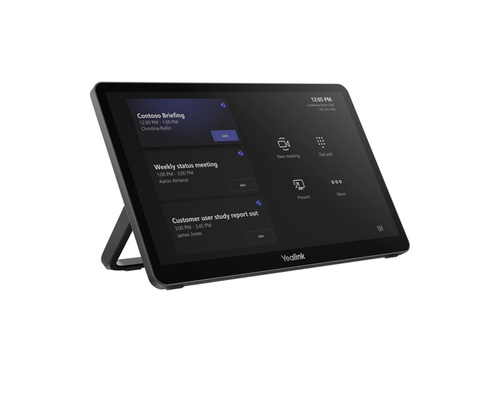
- 11.6-inch anti-fingerprint, anti-glare IPS touchscreen, purpose-built as the central control console for Yealink MVC room systems.
- Runs Android, supporting a wide range of Yealink conferencing platforms.
- One-touch meeting join, camera control, and room scheduling from a single console.
- Powered over PoE for simplified single-cable installation.
- Wireless content sharing via AirPlay, Miracast, and Google Cast, plus wired USB-C sharing with laptop power delivery.
- Flexible wall, flat, or desktop mounting through an adaptable expansion bracket.
- Expandable to additional control positions with the separately available MTouch Plus-EXT (up to four).
- Automatic system wake with the separately available RoomSensor.
Ideal For
- Yealink MVC Series room systems needing a dedicated control console
- Rooms wanting one-touch meeting join, camera control, and scheduling in one place
- Spaces mixing wired and wireless content sharing
- Multi-position control rooms extending to additional consoles with MTouch Plus-EXT
- Standardized MVC deployments specifying a consistent control console
Resources
Yealink MTouch Plus Touch Console for MVC Series Room Systems, 11.6-Inch (1306022)
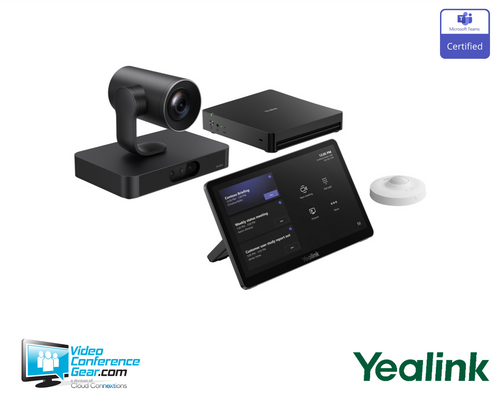
The MTouch Plus is Yealink's third-generation touch console, purpose-built as the central control point for MVC Series room systems. Its 11.6-inch anti-fingerprint, anti-glare IPS screen runs Android and supports Yealink's conferencing platforms, giving users an intuitive touch interface to schedule, launch, and manage meetings, adjust cameras, and share content.
This is the MVC-specific console and is not interchangeable with the MTouch Plus-MB made for the MeetingBoard. It connects to the room system over PoE for single-cable installation, and it supports wired content sharing over USB-C as well as wireless sharing via AirPlay, Miracast, or Google Cast. Before ordering, confirm the room's MVC or MCore-based system, decide on wall, flat, or desktop placement, and consider whether the room needs the optional RoomSensor for automatic wake or additional MTouch Plus-EXT panels for multiple control positions.
Key Specifications
- Manufacturer model: MTouch Plus (SKU 1306022)
- Product type: Touch console for Yealink MVC Series room systems
- Display: 11.6-inch IPS touchscreen, 1920 x 1080, anti-fingerprint, anti-glare
- Operating system: Android
- Ports: Yealink VCH (MCore Pro connection), USB-C 2.0, USB-C with Power Delivery, 2x USB 2.0, RJ-45 Ext Touch port, 3.5 mm headset
- Wireless: Wi-Fi 6, Bluetooth 5.2
- Power: PoE, single-cable installation
- Content sharing: wired via USB-C (with laptop charging when connected to PD power), wireless via AirPlay, Miracast, or Google Cast
- Expansion: up to four MTouch Plus-EXT panels for additional control positions
- Mounting: wall, flat, or desktop, via expansion bracket
What's Included
- MTouch Plus touch panel
- Mounting bracket
- Screwdriver
- Double-side tape
- Mounting screw set
- RJ-45 cable
- USB-C to HDMI / USB-C cable (1.2 m)
- Lock cable buckle
Certifications and Compatibility
- Yealink MVC Series room systems: the MTouch Plus is the dedicated control console for MVC and MCore-based deployments.
- Not compatible with MeetingBoard: the MTouch Plus-MB (1306072) is the correct console for MeetingBoard and MeetingBoard Pro, not this SKU.
- RoomSensor: compatible, sold separately, for automatic system wake on occupancy.
- MTouch Plus-EXT: compatible, sold separately, supporting up to four additional panels for multi-position control.
- Platform support: runs Android and supports Yealink Meeting Rooms platforms, aligned to the connected MVC kit's platform (Teams, Zoom, or RingCentral).
- Compatibility is limited to Yealink-published MVC systems. Confirm the exact system model and firmware before ordering.
Design Considerations
- Confirm the room uses an MVC or MCore-based system. This console does not interchange with the MTouch Plus-MB for MeetingBoard.
- Choose wall, flat, or desktop placement using the expansion bracket, based on room layout and how presenters will interact with the console.
- Plan the PoE run from the network switch to the console position for single-cable installation.
- Consider adding the optional RoomSensor for automatic wake on occupancy, and additional MTouch Plus-EXT panels for larger rooms needing multiple control positions.
- For multi-room standardization, specify the correct MTouch Plus variant per system type so every room gets the compatible console.
VideoConferenceGear.com Assistance
We can confirm the MTouch Plus is the correct console for your MVC or MCore-based system, and make sure it isn't confused with the MTouch Plus-MB used on MeetingBoard. We can help plan wall, flat, or desktop placement and the PoE run to the console position, advise on adding a RoomSensor or MTouch Plus-EXT panels for larger rooms, and standardize console selection across a multi-room or multi-site rollout.
Common Questions
Is this the same as the MTouch Plus-MB?
No. This MTouch Plus is designed for MVC Series and MCore-based room systems. The MTouch Plus-MB is a distinct console for the MeetingBoard and MeetingBoard Pro.
How is it powered?
Over PoE, allowing a single network cable to carry both power and data.
Can it share content wirelessly?
Yes, via AirPlay, Miracast, or Google Cast. Wired content sharing is available over USB-C, and connecting to a PD power supply also charges a connected laptop.
Can I mount it on a wall or desk?
Yes. It supports wall, flat, or desktop placement using an adaptable expansion bracket.
Can more than one console be used in the same room?
Yes, with the separately available MTouch Plus-EXT, supporting up to four additional panels for multiple control positions.
Does it wake the room automatically?
With the optional RoomSensor, the console and system can wake automatically when someone enters the room.
Warranty Information
Standard Manufacturer WarrantyProduct Videos
Custom Field
Product Reviews
Cloud Connextions Nationwide Services - Design, Installation & Support - A Partner You can Trust
Cloud Connextions specializes in delivering next-generation office technologies, including physical security, video conferencing, and ProAV solutions. As a valued partner for the design, integration, and support of these systems, we work with industry leaders like Verkada, Zoom, AVer, Crestron, Poly, and more. Our team ensures you receive top-quality products and seamless service. VideoConferenceGear.com is our trusted online source, where you’ll find rigorously tested products backed by our extensive expertise in creating customized technology solutions for modern office environments.