Highlights
- Wireless presentation with 4K content sharing using one next-gen ClickShare Button (5th Generation) with USB-C DisplayPort.
- Wireless BYOD support for Microsoft Teams Rooms to run other conferencing platforms, including Zoom, Webex, and Google Meet.
- Includes the ClickShare Control Panel for one-tap meeting start.
- Built on the Microsoft Device Ecosystem Platform (MDEP) and requires a Microsoft Teams Rooms license.
- Single HDMI output supporting up to UW5K WUHD (5120 x 2160) at 30Hz.
- Cloud device management and reporting through XMS Cloud.
- Certified for Microsoft Teams as part of a room system bundle.
Ideal For
- Small Microsoft Teams Rooms deployments
- Rooms needing one-tap meeting start alongside wireless BYOD fallback
- Multi-room or multi-site standardization on a certified Teams Rooms bundle
- IT-managed environments using XMS Cloud for fleet monitoring
Resources
Barco ClickShare Hub Core and Control Panel Kit, US, 1 Button (R9461811US)
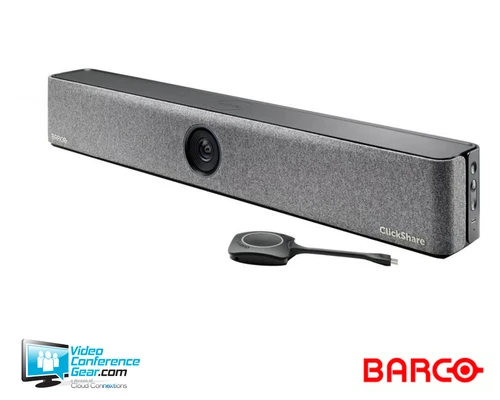
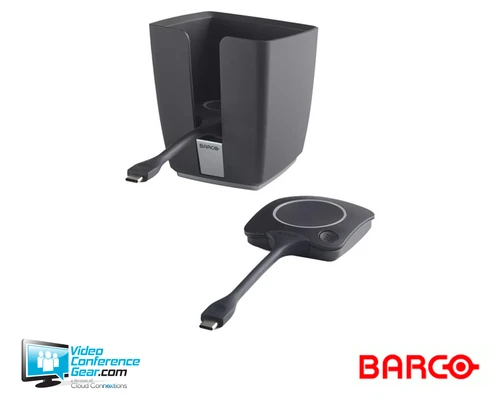
The ClickShare Hub Core and Control Panel Kit pairs Barco's Hub Core base unit with the ClickShare Control Panel and one next-gen ClickShare Button, giving a small meeting room a one-tap Teams meeting start alongside 4K wireless content sharing. The Control Panel handles meeting start and room control, while the Button provides guest-friendly, driver-free wireless sharing.
The system runs on the Microsoft Device Ecosystem Platform (MDEP) and requires a Microsoft Teams Rooms license, which should be confirmed and provisioned separately from the hardware purchase. Unlike Hub Pro, Hub Core supports a single HDMI output rather than dual displays, so confirm this matches the room's display requirements before ordering.
Key Specifications
- Operating system: Android (MDEP)
- Microsoft Teams Rooms license: required
- Video output: HDMI up to UW5K WUHD (5120 x 2160) @30Hz; eDP (Control Panel) HD (1280 x 800) @60Hz
- Video input: 4K UHD (3840 x 2160) @30Hz via HDMI 2.0
- ClickShare Button: 1x 5th Generation
- Wireless: IEEE 802.11 a/b/g/n/ac/ax/be and Bluetooth 5.3; 2.4GHz, 5GHz, and 6GHz bands
- Wireless reach: up to 100 ft. (30 m) between Button and Base Unit
- Noise level: max 25 dBA below 30°C (86°F), max 30 dBA above 30°C (86°F)
- Base Unit connections (rear): 1x Gigabit Ethernet, 1x USB-C Power Delivery 3.1 EPR, 1x HDMI 2.0 output, 1x USB-A 2.0/3.0, 1x USB-C 2.0/3.0, 1x USB-C 2.0/3.0 device + DisplayPort output, 1x USB-C 2.0 + DisplayPort output; front: 1x USB-C 2.0/3.0
- Base Unit dimensions (H x W x D): 1.46 in x 7.09 in x 7.09 in (37 x 180 x 180 mm)
- Base Unit weight: 1.59 lb (720 g)
- Control Panel: 10.1-inch projected capacitive touchscreen, 1280 x 800 @60Hz, 300 nits, up to 4 touch points
- Control Panel dimensions (H x W x D): 10.02 in x 7.40 in x 3.03 in (254.5 x 187.9 x 76.9 mm)
- Control Panel weight: 1.81 lb (820 g)
- Power supply: external USB-C charger, 100 W (PD3.0 SPR) or 180 W (PD3.1 EPR)
- Power consumption: 140 W operational (max)
- Certifications: FCC/CE
- Anti-theft: Kensington lock on Base Unit and Control Panel
What's Included
- ClickShare Hub Core Base Unit
- 1x ClickShare Button, 5th Generation
- ClickShare Control Panel
- Mounting disc
- ClickShare 10M 20W USB-C AOC cable
- L-shape mounting plate
- Round base
- Screw pack
- USB-C cable lock kit
- Power cord and power supply
- Safety manual and quick setup guide
Certifications and Compatibility
- Certified for Microsoft Teams as part of a room system bundle; requires a Microsoft Teams Rooms license.
- Supports wireless BYOD for other videoconferencing platforms, including Zoom, Webex, and Google Meet.
Design Considerations
- Confirm and provision the Microsoft Teams Rooms license separately before deployment; it is not included with the hardware.
- Confirm the single HDMI output meets the room's display needs, since Hub Core does not support the dual-display output available on Hub Pro.
- Confirm the power adapter used, since maximum Power Delivery differs between the 100 W (PD3.0 SPR) and 180 W (PD3.1 EPR) options.
Licensing, Warranty & Support
A Microsoft Teams Rooms license is required and is provisioned separately from the hardware purchase. Barco's standard warranty on this kit is 3 years. The system is managed and monitored through XMS Cloud.
VideoConferenceGear.com Assistance
We can help confirm Teams Rooms licensing requirements before you order, evaluate whether Hub Core's single-display output fits your room, and advise on power adapter selection. We can also support standardizing this kit across a multi-room or multi-site rollout.
Common Questions
Does this kit include the ClickShare Control Panel?
Yes. The Control Panel is included and provides one-tap meeting start.
Does it require a Microsoft Teams Rooms license?
Yes. The system is built on the Microsoft Device Ecosystem Platform and requires a Microsoft Teams Rooms license, provisioned separately from the hardware.
Does it support dual displays?
No. Hub Core supports a single HDMI output. Dual-display support is available on Hub Pro.
What warranty applies to this kit?
3 years standard.
Warranty Information
Standard Manufacturer WarrantyProduct Videos
Custom Field
Product Reviews
Cloud Connextions Nationwide Services - Design, Installation & Support - A Partner You can Trust
Cloud Connextions specializes in delivering next-generation office technologies, including physical security, video conferencing, and ProAV solutions. As a valued partner for the design, integration, and support of these systems, we work with industry leaders like Verkada, Zoom, AVer, Crestron, Poly, and more. Our team ensures you receive top-quality products and seamless service. VideoConferenceGear.com is our trusted online source, where you’ll find rigorously tested products backed by our extensive expertise in creating customized technology solutions for modern office environments.