
Highlights
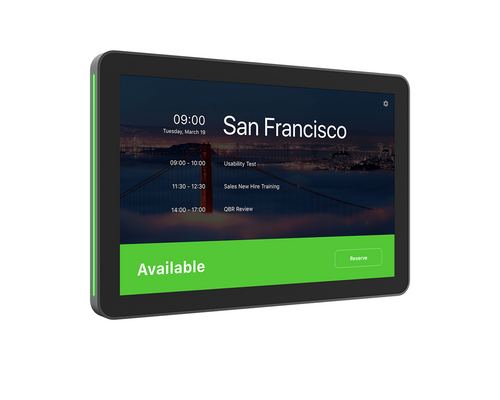
- 10.1-inch Full HD IPS touchscreen (1920 x 1200) with 400 nits brightness and anti-glare, oleophobic coating for clear, fingerprint-resistant viewing.
- High-visibility LED status lighting signals room availability in green or red from a distance, reducing interruptions at the door.
- Radar motion sensor wakes the display automatically as someone approaches, with an ambient light sensor supporting adaptive brightness.
- Single PoE cable connection powers the device and carries network data, keeping installation clean with horizontal, vertical, or center cable exit options.
- Includes multi-surface mount for glass or drywall, a corner mount accessory, and a mullion mount, supporting most common door-side installations out of the box.
- Compatible with Microsoft Teams Panel, Zoom Rooms Scheduling Display, Logitech Room Booking, Appspace, and Robin, with platform flexibility for future changes.
- Runs Logitech CollabOS and integrates with Logitech Sync, Microsoft Teams Admin Center, and Zoom Device Management for centralized remote administration.
Ideal For
- Corporate campuses standardizing room scheduling panels across multiple floors or buildings
- Hybrid workplaces where employees need to quickly identify and reserve available rooms before entering
- Non-video rooms and huddle spaces that need scheduling visibility without a full conferencing system inside
- IT teams managing large panel deployments remotely through Logitech Sync or Teams Admin Center
- Organizations upgrading from original Logitech Tap Scheduler using existing mounting hardware
- Spaces where clean, cableless-looking installation is required for aesthetic or compliance reasons
Resources
- Logitech Tap Scheduler 2 product page
- Tap Scheduler 2 specifications (Logitech Sync Hub)
- Tap Scheduler 2 datasheet (PDF)
- Tap Scheduler 2 compatibility and certifications
- Tap Scheduler 2 support hub
Logitech Tap Scheduler 2 10.1" Room Scheduling Panel, Off-White, with Multi-Surface Mount and PoE
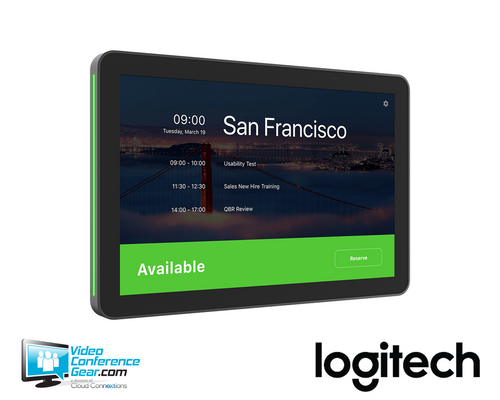
The Logitech Tap Scheduler 2 (952-000298) is a purpose-built room scheduling panel designed to mount outside meeting rooms and give employees an immediate read on availability without opening the door. Its 10.1-inch Full HD IPS touchscreen delivers clear meeting detail at close range, while integrated green and red LED status lighting communicates room availability from down the hall. A radar motion sensor wakes the display as someone approaches, keeping power consumption low when the corridor is empty. A single Power over Ethernet connection handles both data and power, and the included multi-surface mount, corner mount accessory, and mullion mount provide flexible placement options without additional hardware purchases for most installations.
Tap Scheduler 2 is network-independent of the room system inside, so it can be placed wherever a PoE-enabled network port is available near the entrance, whether or not the space contains a video conferencing system. It runs Logitech CollabOS and supports several leading scheduling platforms, so a future change in services does not require replacing the panel. Organizations already running the original Tap Scheduler can reuse existing mounting hardware during an upgrade. Before deployment, confirm that a PoE-enabled switch port or PoE injector is present at each installation point, that the preferred scheduling platform is among the supported options, and that the 14-degree tilt of the flat-mount position suits the intended viewing height. An optional angle mount is available separately for lower or angled viewing when needed.
Key Specifications
- Manufacturer part number: 952-000298 | Model number: VR0054
- Color: Off-White
- Display: 10.1-inch diagonal IPS (in-plane switching) anti-glare LCD panel with LED backlighting
- Resolution: 1920 x 1200
- Touch: Capacitive, 10-point multi-touch
- Brightness: 400 nits | Contrast: 1500:1
- Viewing angle: 85° (up/down/left/right) | Display angle: 14°
- Anti-fingerprint: Oleophobic coating
- Sensors: Radar motion, accelerometer, ambient light
- Power: Power over Ethernet (PoE), IEEE 802.3af Type 1, Class 3 (PoE switch or injector and Ethernet cable not included)
- Ethernet: 10/100 Mbps
- Wi-Fi: 802.11a/b/g/n/ac/ax
- Bluetooth: 5.0
- Mounting pattern: 100 mm x 100 mm VESA FDMI
- Cable exits: Horizontal / vertical / center
- Operating system: Logitech CollabOS
- Security: AES-128 full-disk encryption, PKI data encryption, device attestation, Arm TrustZone key protection, Kensington Lock slot
- Dimensions (device only): 165 mm H x 246.2 mm W x 28.5 mm D (6.5 x 9.69 x 1.12 in)
- Dimensions (surface-mounted): 165 mm H x 246.2 mm W x 31.4 mm D
- Dimensions (mullion-mounted): 165 mm H x 292.6 mm W x 44.5 mm D
- Weight: 0.7 kg (1.5 lbs)
- Operating temperature: 0 to 40°C | Storage temperature: -40 to 70°C | Humidity: 10 to 95%
What's Included
- Logitech Tap Scheduler 2 touch panel
- Multi-surface mount (glass/drywall)
- Corner mount accessory
- Mullion mount
- Mounting hardware
- Documentation
Compatibility
- Scheduling platforms: Microsoft Teams Panel, Zoom Rooms Scheduling Display, Logitech Room Booking, Appspace meeting room display, and Robin room display. See the Tap Scheduler 2 compatibility page for the latest certification status.
- Device management: Logitech Sync, Microsoft Teams Admin Center, and Zoom Device Management platforms support centralized remote monitoring and administration.
- Logitech Spot integration: Pair with Logitech Spot occupancy and environmental sensors to enable presence detection, auto-release of no-show reservations, and space utilization insights. Insights, auto-book, and auto-release features require a Logitech service plan license.
- Mounting hardware: Tap Scheduler 2 is compatible with original Logitech Tap Scheduler glass, mullion, and wall mounts, making upgrades from the first generation straightforward.
- Network: Connects via wired PoE Ethernet or Wi-Fi (802.11a/b/g/n/ac/ax). A PoE-enabled network switch port or PoE injector and Ethernet cable are required for wired deployment and are not included.
- Optional angle mount: Available separately for installations requiring a lower or angled viewing position.
Licensing, Warranty & Support
Tap Scheduler 2 operates with supported scheduling platforms through standard app configuration and does not require a Logitech subscription for basic scheduling panel use. However, advanced workspace features including occupancy insights, auto-book, and auto-release when paired with Logitech Spot require a Logitech service plan license. The Tap Scheduler 2 includes a standard two-year limited hardware warranty from the date of purchase by the end user. An extended warranty is available separately, adding one additional year for a total of three years of coverage. Logitech Sync provides remote device management, monitoring, and auto-provisioning at scale. Support documentation, firmware updates, and setup guides are available through the Logitech Sync Hub at hub.sync.logitech.com.
VideoConferenceGear.com Assistance
We can help confirm that your preferred scheduling platform is currently certified for Tap Scheduler 2, verify that PoE is available at each planned installation point, and advise on mounting selection based on your wall or glass surface type. If your project involves upgrading from the original Tap Scheduler, we can walk through mount reuse and configuration options. For multi-room or campus-wide rollouts, we can assist with Logitech Sync provisioning planning and help determine whether a Logitech service plan license is needed to enable the space-utilization features your team requires.
Common Questions
Does Tap Scheduler 2 require a room video conferencing system to function?
No. Tap Scheduler 2 connects to the network independently and is not physically tethered to a room AV system. It can be placed outside any space, including non-video rooms, wherever a PoE network connection is available.
Is a PoE switch required, or can a PoE injector be used?
Either works. Tap Scheduler 2 is a PoE IEEE 802.3af Type 1, Class 3 device and can be powered by a PoE-enabled switch port or a standalone PoE injector. The Ethernet cable and PoE source are not included.
Can it connect over Wi-Fi instead of a wired Ethernet connection?
Yes. Tap Scheduler 2 supports Wi-Fi 802.11a/b/g/n/ac/ax and can operate on a wireless network. A wired PoE connection is still required if wired installation is preferred or if Wi-Fi is not suitable for the location.
Will this panel work with the mounting hardware from the original Tap Scheduler?
Yes. Tap Scheduler 2 uses the same glass, mullion, and wall mounts as the original Tap Scheduler, so existing hardware from a prior installation can be reused during an upgrade.
Do advanced features like auto-release and occupancy insights require a subscription?
Yes. Auto-book, auto-release, and space-utilization insights, which rely on integration with Logitech Spot sensors, require a Logitech service plan license. Standard scheduling panel operation does not require a subscription.
What if the room changes scheduling platforms in the future?
Tap Scheduler 2 supports multiple scheduling services. If the platform changes, the device can be reset and reconfigured for a different supported app without replacing the hardware.
Warranty Information
Standard Manufacturer WarrantyProduct Videos
Custom Field
Product Reviews
Cloud Connextions Nationwide Services - Design, Installation & Support - A Partner You can Trust
Cloud Connextions specializes in delivering next-generation office technologies, including physical security, video conferencing, and ProAV solutions. As a valued partner for the design, integration, and support of these systems, we work with industry leaders like Verkada, Zoom, AVer, Crestron, Poly, and more. Our team ensures you receive top-quality products and seamless service. VideoConferenceGear.com is our trusted online source, where you’ll find rigorously tested products backed by our extensive expertise in creating customized technology solutions for modern office environments.